Project Planning and Control Using Primavera Contractor Version 6: Including Versions 4.1, 5.0 and 6.1

Setting the Baseline makes a complete copy of a project, including relationships, notebook entries and codes.
Up to four baselines may be displayed and compared to the current project. These are the Project Baseline and three User Baselines the Primary, Secondary and Tertiary Baselines. The term User Baseline comes from Primavera Version 6 where multiple users may open one project and each user assign a different Baseline to the same project and has no relevance in Primavera Contractor as there may only be one user.
A baseline project may not be opened but may be restored back into a database as a normal project. It may be edited and resaved as a baseline project.
After the Baseline is set, it is possible to compare the progress with the original plan or at any point in time when a baseline has been set. You will be able to see if you are ahead or behind schedule and by how much. The Baseline schedule should be established before you status the schedule for the first time.
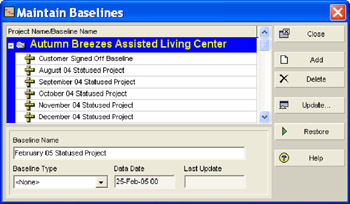
To save a Baseline, select Project, Maintain Baselines to display the Maintain Baselines form:

To create baseline click the
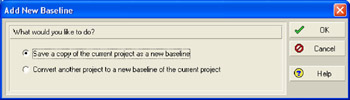
button to open the Add New Baseline form:

Select either of the two options in the form:
Save a copy of the current project as a new baseline will make a copy of the currently open...