 | This up-to-date text/reference is designed to present the fundamental principles of robotics with a strong emphasis on engineering applications and industrial solutions based on robotic technology. It can be used by practicing engineers and scientists - or as a text in standard university courses in robotics. The book has extensive coverage of the major robotic classifications, including Wheeled Mobile Robots, Legged Robots, and the Robotic Manipulator. A central theme is the importance of kinematics to robotic principles. The book is accompanied by a CD-ROM with MATLAB simulations, photographs, tutorials, and third-party software (see About the CD-ROM section). |
 TABLE OF CONTENTS
 Robotics
3.4 Sensor Design
Without sensors, a robot is just a machine. Robots need sensors to deduce what is happening in their world and to be able to react to changing situations. This section introduces a variety of robotic sensors and explains their electrical use and practical application. The sensor applications presented here are not meant to be exhaustive, but merely to suggest some of the possibilities.
Sensors as Transducers
The basic function of an electronic sensor is to measure some feature of the world, such as light, sound, or pressure and convert that measurement into an electrical signal, usually a voltage or current. Typical sensors respond to stimuli by changing their resistance (photocells), changing their current flow (phototransistors), or changing their voltage output (the Sharp IR sensor). The electrical output of a given sensor can easily be converted into other electrical representations.
Analog and Digital Sensors
There are two basic types of sensors: analog and digital. The two are quite different in function, in application, and in how they are used with the Robo-Board. An analog sensor produces a continuously varying output value over its range of measurement. For example, a particular photocell might have a resistance of 1k ohm in bright light and a resistance of 300k ohm in complete darkness. Any value between these two is possible depending on the particular light level present. Digital sensors, on the other hand, have only two states, often called on and off. Perhaps the simplest example of a digital sensor is the touch switch. A typical touch switch is an open circuit (infinite resistance) when it is not pressed, and a short circuit (zero resistance) when it is depressed.
Some sensors that produce a digital output are more complicated. These sensors produce pulse trains of transitions between the 0-volt state and the 5-volt state. With these types of sensors, the frequency characteristics or shape of this pulse train convey the sensor s measurement. An example of this type of sensor is the Sharp modulated infrared light detector. With this sensor, the actual element-measuring light is an analog device, but signal-processing circuitry is integral to the sensor producing a digital output.
Sensor Inputs on the RoboBoard
The RoboBoard contains input ports for both analog and digital sensors. While both types of ports are sensitive to voltage, each type interprets the input voltage differently and provides different data to the microprocessor. The analog ports measure the voltage and convert it to a number between 0 and 255, corresponding to input voltage levels between 0 and 5 volts. The conversion scale is linear, so a voltage of 2.5 volts would generate an output value of 127 or 128. The digital ports, however, convert an input voltage to just two output values, zero and one. If the voltage on a digital port is less than 2.5 volts, the output will be 0, while if the input is greater than 2.5 volts, the output will be 1. Thus, the conversion is very nonlinear.
Reading Sensor Inputs
The C library function analog (port-#) is used to return the value of a particular analog sensor port. For example, the IC statementval = analog(27);
sets the value of the variable val equal to the output of port #27.Many devices used as digital sensors are wired to be active low, meaning that they generate 0 volts when they are active (or true). The digital inputs on the RoboBoard have a pull-up resistor that makes the voltage input equal to 5 volts when nothing is connected. A closed or depressed touch switch connected to a digital port would change that voltage to 0 volts by shorting the input to ground. The resulting outputs: open switch = 1, and closed switch = 0, are the logical opposite of what we usually want. That is, we would prefer the output of the digital port to have value 0 or False normally, and change to 1 or True only when the switch hit something (like a wall or another robot) and was depressed. The IC library function digital (port-#), used to read a True-or-False value associated with a particular sensor port, performs this logical inversion of the signal measured on a digital port. Hence, the depressed touch switch (measuring 0 volts on the hardware) causes the digital () function to return a 1 (logic True) or logical True value.
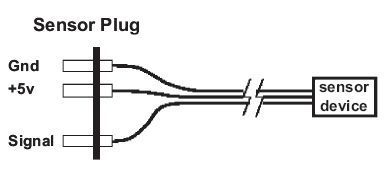
FIGURE 3.32 Generic sensor wiring.
For example, the C statement
if (digital(2)) do_it();
returns a True value (the number 1) and calls the function do_it() if the value at port #2 was 0 volts (indicating a depressed switch).
Connector Plug Standard
The standard plug configuration used to connect sensors to the RoboBoard is shown in Figure 3.32. Notice that the plug is asymmetric (made by removing one pin from a four-pin section of the male header), and is therefore polarized. The plug can only be inserted in the RoboBoard port in one orientation, so once the plug is wired correctly, it cannot be inserted into a sensor port backward. This makes the plug much easier to use correctly, but, of course, if you wire it incorrectly, you must rewire it since you cannot turn the plug around.
Generally, the sensor is connected to the plug with three wires. Two of the wires supply 5-volt power from the RoboBoard, labeled +5v and Gnd. The third wire, labeled Signal is the voltage output of the sensor. It is the job of the sensor to use the power and ground connections (if necessary) and return its answer, as a voltage, on the Signal wire.
Sensor Wiring
Figure 3.33 shows a diagram of circuitry associated with each sensor. This circuitry, residing on the RoboBoard, is replicated for each sensor input channel. The key thing to notice is the pull-up resistor wired from the sensor input signal leads to the 5-volt power supply.
There are two reasons why this resistor is used. First, it provides a default value for the sensor input a value when no sensor is plugged in. Many ICs, such as those on the board that read and interpret the sensor voltage, do not perform

FIGURE 3.33 Sensor input port circuitry.
well when their inputs are left unconnected. With this circuit, when nothing is plugged into the sensor port, the pull-up resistor provides a 5-volt bias voltage on the sensor input line. Thus, the default output value of an analog port is 255, while the default output value of a digital port is 0 or logic False. (Remember that the 5-volt default input value would lead to a digital value of 1 except that this value is inverted by the digital () library function, as explained earlier.)
Second, the pull-up resistor is also used as part of the voltage divider circuit required for some of the analog sensors, as explained in the following section. The resistors on the RoboBoard eliminate the need for an additional resistor on each of the sensors.
The Voltage Divider Circuit
Most of the sensors used in the RoboBoard kit make use of the voltage divider circuit shown in Figure 3.34. In the voltage divider, the voltage measured at the common point of the two resistors, Vout, is a function of the input voltage, Vin (5 volts in this case), and the values of the two resistors, R1 and R2. This voltage can be calculated using Ohm s law, V=I R. The current, I, flowing through the circuit shown in the diagram, is Vin / R1+R2 (calculated using the rule that series resistances add). Then Vout, the voltage drop across R2, is R2 i, which yields the result:
Vout = Vin (R2 / R1+R2).
In ELEC 201 applications, R1 has a fixed or constant value (as shown in Figure 3.34), while R2 is the variable resistance produced by the sensor. Vin is the positive voltage supply, fixed at 5 volts. Thus, the Vout signal can be directly

FIGURE 3.34 Voltage divider schematic.
computed from R2, the resistive sensor. From looking at the equation, it is easy to see that if R2 is large with respect to R1, the output voltage will be large, and if R2 is small with respect to R1, the output voltage will be small. The minimum and maximum possible voltage values are 0 and 5 volts, matching the RoboBoard input circuitry range.
Tactile Sensors
The primary sensors in the ELEC 201 kit used to detect tactile contact are simple push-button or lever-actuated switches. Microswitch is the brand name of a variety of switches that are so widely used that the brand name has become the generic term for this type of switch, which is now manufactured by many companies. A microswitch is housed in a rectangular body and has a very small button (the switch nub ) which is the external switching point. A lever arm on the switch reduces the force needed to actuate the switch (see Figure 3.35). Microswitches are an especially good type of switch to use for making touch sensors.

FIGURE 3.35 A typical microswitch.

FIGURE 3.36 Robotic platform employing a bumper coupled to a touch sensor.
Often, the switch is simply mounted on a robot so that when the robot runs into something, the switch is depressed, and the microprocessor can detect that the robot has made contact with some object and take appropriate action. However, creative mechanical design of the bumper-switch mechanism is required so that contact with various objects (a wall, a robot, etc.) over a range of angles will be consistently detected. A very sensitive touch bumper can be made by connecting a mechanism as an extension of the microswitch s lever arm, as illustrated in Figure 3.36.
Limit Switch
Touch sensors can also serve as limit switches to determine when some movable part of the robot has reached the desired position. For example, if a robot arm is driven by a motor, perhaps using a gear rack, touch switches could detect when the arm reached the limit of travel on the rack in each direction.
Switch Circuitry
Figure 3.37 shows how a switch is wired to a sensor input port. When the switch is open (as it is shown in the diagram), the sensor input is connected to the 5-volt supply by the pull-up resistor. When the switch is closed, the input is connected directly to ground, generating a 0-volt signal (and causing current to flow through the resistor and switch).
Most push-button-style switches are normally open, meaning that the switch contacts are in the open-circuit position when the switch has not been pressed. Microswitches often have both normally open and normally closed contacts along with a common contact. When wiring a microswitch, it is customary to use the normally open contacts. Also, this configuration is the active-low mode expected by the standard library software used to read the output values

FIGURE 3.37 Touch switch circuit.
from digital sensor ports. However, you can wire the switch differently to perform some special function. In particular, several switches can be wired in series or parallel and connected to a single digital input port. For example, a touch bumper might have two switches, and the robot only needs to know if either of them (#1 OR #2) are closed. It takes less code and less time to check just one digital port and to use parallel switch wiring to implement the logic OR function in hardware.
Mercury Tilt Switch
As the name suggests, a mercury tilt switch contains a small amount of mercury inside a glass bulb. The operation of the switch is based on the unique properties of mercury: it is both a conductor and a liquid. When the switch tilts mercury flows to the bottom of the bulb closing the circuit between two metal pins.
The mercury tilt switch can be used in any application to sense inclination. For example, the tilt switch could be used to adjust the position of an arm or ramp. Most thermostats contain a mercury tilt switch mounted on a temperature sensitive spring. Changes in temperature tilt the switch, turning the furnace or air conditioner on or off.
Light Sensors
Measurement of light provides very valuable information about the environment. Often, particular features of the game board (such as goals) are marked by a strong light beacon. The board surface has contrasting lines that can be detected by the difference in the amount of light they reflect. A variety of light sensors are provided in the ELEC 201 kit:
Infrared Reflectance Sensor
This device combines an infrared LED light source and a phototransistor light detector into a single package. The LED and the detector point out of the package, almost parallel to each other. The detector will measure the light scattered or reflected by a surface a short distance away. The package also contains an optical filter (colored plastic) that transmits primarily only the infrared light from the LED; this reduces, but does not eliminate, the sensitivity to ambient light.
Infrared Slotted Optical Switch
This device is similar to the IR reflectance sensor, in that it contains both an infrared source and a filtered infrared phototransistor detector. However, the two are mounted exactly opposite each other with a small, open gap between them. The sensor is designed to detect the presence of an object in the gap that blocks the light.
Modulated Infrared Light Detector
This device senses the presence of infrared light that has been modulated (e.g., blinks on and off) at a particular frequency. These devices are typically used to decode the signals of TV remote controls, but are used in the ELEC 201 application to detect the infrared beacon of the opponent robot.
Photocell
This device is a light-dependent resistor. It is most sensitive to visible light in the red.
Photocells are made from a compound called cadmium sulfide (CdS) that changes resistance when exposed to varying degrees of light. Cadmium sulfide photocells are most sensitive to visible red light, with some sensitivity to other wavelengths.
Photocells have a relatively slow response to changes in light. The characteristic blinking of overhead fluorescent lamps, which turn on and off at the 60 Hertz line frequency, is not detected by photocells. This is in contrast to phototransistors, which have frequency responses easily reaching above 10,000 Hertz and more. Therefore, if both sensors were used to measure the same fluorescent lamp, the photocell would show the light to be always on and the phototransistor would show the light to be blinking on and off.
Photocells are commonly used to detect the incandescent lamp that acts as a contest start indicator. They are also used to find the light beacons marking certain parts of the board, such as the goals. While they can be used to measure the reflectivity of the game board surface if coupled with a light source such as a red LED or an incandescent lamp, the IR reflectance sensors are usually better at this function. Photocells are sensitive to ambient lighting and usually need to be shielded. Certain parts of the game board might be marked with polarized light sources. An array of photocells with polarizing filters at different orientations could be used to detect the polarization angle of polarized light and locate those board features.
The photocell acts as resistor R2 in the voltage divider configuration. The resistance of a photocell decreases with an increase in illumination (an inverse relationship). Because of the wiring of the voltage divider (the photocell is on the lower side of the voltage divider), an increase in light will correspond to a decrease in sensor voltage and a lower analog value.
Infrared Reflectance Sensor
The infrared reflectance sensor is a small rectangular device that contains a phototransistor (sensitive to infrared light) and an infrared emitter. The amount of light reflected from the emitter into the phototransistor yields a measurement of a surface s reflectance, for example, to determine whether the surface is black or white. The phototransistor has peak sensitivity at the wavelength of the emitter (a near-visible infrared), but is also sensitive to visible light and infrared light emitted by visible light sources. For this reason, the device should be shielded from ambient lighting as much as possible in order to obtain reliable results.
The amount of light reflected from the emitter into the phototransistor yields a measurement of a surface s reflectance (when other factors, such as the distance from the sensor to the surface, are held constant). The reflectance sensor can also be used to measure distance, provided that the surface reflectance is constant. A reflectance sensor can be used to detect features drawn on a surface
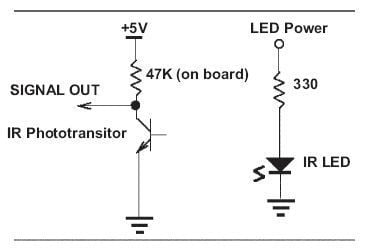
FIGURE 3.38 Phototransistor and infrared emitter circuit.
or segments on a wheel used to encode rotations of a shaft. It is important to remember that the reflectivity measurement indicates the surface s reflectivity at a particular wavelength of light (the near-visible infrared). A surface s properties with respect to visible light may or may not be indicators of infrared light reflectance. In general, though, surfaces that absorb visible light (making them appear dark to the eye) will absorb infrared light as well. The sensor part (the phototransistor) can be used alone as a light sensor, for example, to detect the starting light, and it is usually much more sensitive than the photocell.
Phototransistor
The light falling on a phototransistor creates charge carriers in the base region of a transistor, effectively providing base current. The intensity of the light determines the effective base drive and thus the conductivity of the transistor. Greater amounts of light cause greater currents to flow through the collector-emitter leads. Because a transistor is an active element having current gain, the phototransistor is more sensitive than a simple photoresistor. However, the increased sensitivity comes at the price of reduced dynamic range. Dynamic range is the difference between the lowest and highest levels that can be measured. The RoboBoard analog sensor inputs have a range of 0 5 volts, and relatively small variations in light can cause the phototransistor output to change through this range. The exact range depends on the circuit used.
As shown in Figure 3.38, the phototransistor is wired in a configuration similar to the voltage divider. The variable current traveling through the resistor causes a voltage drop in the pull-up resistor. This voltage is measured as the output of the device.
Infrared Emitter
The Light Emitting Element (an LED) uses a resistor to limit the current that can flow through the device to the proper value of about 10 milliamps. Normally the emitter is always on, but it could be wired to one of the LED output ports if you wanted to control it separately. In this way you could use the same sensor to detect the starting light (using the phototransistor with the emitter off) and then to follow a line on the board (normal operation with the emitter on).
Infrared Slotted Optical Switch
The infrared slotted optical switch is similar to the infrared reflectance sensor except that the emitter is pointed directly at the phototransistor across a small gap. As the name implies, the slotted optical switch is a digital sensor, designed to provide only two output states. The output of the switch changes if something opaque enters the gap and blocks the light path. The slotted optical switch is commonly used to build shaft encoders, which count the revolutions of a shaft. A gear or other type of wheel with holes or slots is placed in the gap between the emitter and detector. The light pulses created by the turning wheel can be detected and counted with special software to yield rotation or distance data. This detector also might be used to detect when an arm or other part of the robot has reached a particular position by attaching a piece of cardboard to the arm so that it entered the gap at the desired arm position.
The slotted optical switch operates in the same fashion as the infrared reflectance sensor, with the exception that a different value of pull-up resistor must be added externally for the particular model of optical switch we use.
Modulated Infrared Light Detector
The modulated infrared light detector is a device that combines an infrared phototransistor with specialized signal-processing circuitry to detect only light that is pulsing at a particular rate. The ELEC 201 kit includes the Sharp GP1U52 sensor, which detects the presence of infrared light modulated (pulsed) at 40,000 Hz. Normal room light, which is not modulated, does not affect the sensor, a big advantage. This type of sensor is used for the remote control function on televisions, VCRs, etc. In ELEC 201 this sensor is used to detect the specially modulated infrared light emitted by the beacon on the opponent robot. The software can distinguish different pulse patterns in order to distinguish between the beacons on the two robots. (In a television remote, different pulse patterns would correspond to different functions, such as changing the channel up or down.)
The principles of operation and use are explained later, when we discuss the circuit used to create the modulated infrared light for the beacon.
Other Sensors
Magnetic Field SensoAvrs
The ELEC 201 kit contains both an analog sensor that provides information about the strength of the magnetic field and a digital sensor, a magnetic switch.
A device called a hall-effect sensor can be used to detect the presence and strength of magnetic fields. The hall-effect sensors have an output voltage even when no magnetic field is present, and the output changes when a magnetic field is present, the direction of change depending on the polarity of the field.
The digital magnetic sensors are simple switches that are open or closed. Internally the switches have an arm made of magnetic material that is attracted to a magnet and moves to short out the switch contacts. These switches are commonly used as door and window position sensors in home security systems. The switch will close when it comes within 1" of its companion magnet.
|
| ||||||||||||||||||||||||||||||||||||||||||||||||||||||
Figure 3.39 below provides a visual representation of the hall-effect sensor s range. 2.55 V or 130 on the RoboBoard is the zero reading or when no magneticfield is detected. Fluctuations in voltage may cause a change in the RoboBoard reading by up to two units. For certain detection, look for a change of five units.
For a change of 5 units on the RoboBoard reading, the hall-effect sensor has a range of less than 2.5 cm. This provides a precise tool for determining location designated by a magnet, but offers a limited margin for error.

FIGURE 3.39
Either sensor can be used to detect magnets or magnetic strips that may be present on the ELEC 201 game board table. With the magnets typically used on the game board, the hall-effect sensor output voltage changes only a small amount when a field is present. The no-field voltage varies between sensors, but it is very stable for a particular sensor, so the small changes can be detected reliably to determine the presence of a magnet. Hall-effect sensors can be used to make magnetic shaft encoders by mounting a small piece of magnet on a wheel that rotates past the sensor element. Hall-effect sensors can also be used to build a proximity sensor or bounce-free switch, which detects a magnet mounted on a moving component when it is near the sensor element.
Magnetic switches are used in much the same way as a touch switch, except the switch closes when it is near a magnet, instead of when it contacts something. The digital nature of the switch makes it easier to use than the hall-effect sensors, but it may be less sensitive. You should try both.
They can also be used to make an inclination sensor by dangling a magnet above the sensor.
The hall-effect sensor included in the ELEC 201 kit is a digital device that operates from a 5-volt power supply. It uses about 6 mA of current for standard operation. It can sink 250 mA of current into its output, creating logic low. The sensor cannot drive logic high and therefore requires a pull-up resistor for proper operation.
Motor Current Sensor
The motor output drivers of the ELEC 201 RoboBoard contain circuitry that produces an output voltage related to the amount of current being used by a motor. Since the motor current corresponds to the load on the motor, this signal can be used to determine if the motor is stalled and the robot is stuck. The voltage signal depends on a number of factors, including battery voltage, and must be calibrated for each application.
© 2006-2026 Infinity Science Press. All rights reserved.