FAST Creativity & Innovation: Rapidly Improving Processes, Product Development and Solving Complex Problems

PREVENT FILAMENT OXIDATION

Step 10. Develop Secondary Path Functions

Copy your latest logic diagram and paste it at the bottom of your working file, and use the Why-How Logic to develop your secondary path functions. Use the function clusters to aid you in doing this. As functions within function clusters are merged, post a "10" near the left margin to indicate that they were merged during Step 10. If perchance any clusters remain that have not been merged, copy and paste them at the end of the working file. Then expand these remaining clusters by asking "why" of the highest level function. Each time you add a new why function, ask "why" of it until you are able to discover where these clusters fit into the diagram.

Step 10 for Project 1. Develop Secondary Path Functions

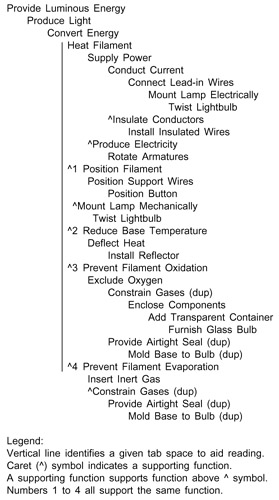
A copy of the logic diagram in Figure 8.12 is copied and pasted at the end of this file and then identified as Figure 8.13. After applying the Why-How Logic to all of the supporting functions while at the same time considering all the remaining function clusters, the logic diagram is expanded until it looks like FAST Tree 4 shown in Figure 8.13. Note that each function within a cluster that is merged into the FAST Tree during Step 10 is updated by placing a "10" near the left margin. Also note that a supporting function may also have a function that supports it.


Figure 8.13: Lightbulb FAST Tree 4

Since all the functions...

UNLIMITED FREE
ACCESS
TO THE WORLD'S BEST IDEAS

SUBMIT
Already a GlobalSpec user? Log in.

This is embarrasing...

An error occurred while processing the form. Please try again in a few minutes.

Customize Your GlobalSpec Experience

Category: Programmable Logic Controllers (PLC)
Finish!
Privacy Policy

This is embarrasing...

An error occurred while processing the form. Please try again in a few minutes.