The Focal Easy Guide to Adobe Encore DVD 2.0

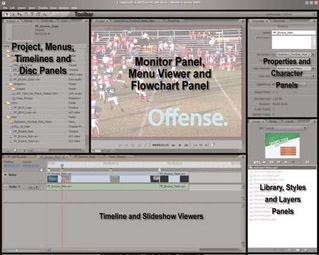
The interface in Adobe Encore DVD 2.0 is brand new and greatly improved over previous versions. It wastes almost no space and rearranging the working area is fast and efficient. Despite its very different feel, you may soon wish that all your programs worked like this!
Since this interface paradigm is new to Encore specifically and to Windows in general, I m going to take a little bit of extra time to cover how it works.
The interface is made up of several frames that consist of one or more panels.
Each individual panel is accessed by a tab at the top of the frame. The frames are resizable inside the main application window. Each of these frames used to be a separate window in earlier versions of Encore. By switching to this new frames-and-panel layout, Adobe has converted the space that would have been required for titlebars, status bars, buttons and other window stuff into usable screen real estate.
If you have a dual-monitor computer desktop, the space created by the new interface design is a bonus. But more importantly, this additional space is very good news for DVD authors who use a single-monitor computer desktop, and for authors who are creating projects on laptops while traveling. For the purposes of this book, we will work with layouts optimized for single-monitor systems.
Encore has four special panels that are called viewers. Viewers are panels that can have more than...