The Focal Easy Guide to Adobe Encore DVD 2.0

The Safe Area

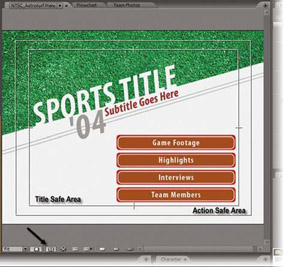
You can toggle the display of the Safe Area on and off in the Menu viewer. The Safe Area shows both the Action Safe Area (the outer rectangle) and the Title Safe Area (the inner rectangle). As we work in Encore, we will be concerned exclusively with the Title Safe Area.

Having the Title Safe Area marked in the Menu viewer while you work is important if the finished DVD will be shown on a consumer television set. Because broadcast television programs have timing signals and other artifacts at the extreme edges of the frame, almost all TVs are overscanned to push these ugly artifacts out of the viewable area so that they are never seen by the audience. Even though a DVD isn t a broadcast program, it can still be affected by overscan. If you put your menu objects too close to the edge of the video frame while you are working on your computer, parts of them could get pushed off-screen when the menu is displayed on a TV. Keeping all of your menu objects inside the Title Safe Area ensures that they won t get cut off.


Use this button to toggle the display of the Safe Areas on and off

In addition to the Safe Area display, you can see how your menu will look on a TV if you enable Edit ?Preferences ? Audio/Video Out ? Show Menu Editor on DV Hardware. You will need to connect your computer s firewire port to a...

UNLIMITED FREE
ACCESS
TO THE WORLD'S BEST IDEAS

SUBMIT
Already a GlobalSpec user? Log in.

This is embarrasing...

An error occurred while processing the form. Please try again in a few minutes.

Customize Your GlobalSpec Experience

Category: Video Cameras
Finish!
Privacy Policy

This is embarrasing...

An error occurred while processing the form. Please try again in a few minutes.