The Focal Easy Guide to Adobe Encore DVD 2.0

Manipulating Menu Objects

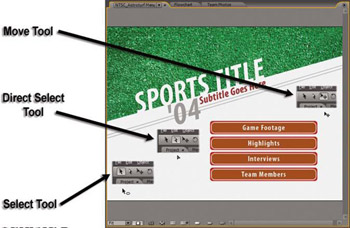
Encore has three tools for selecting and moving menu objects. They each have distinct functions, and knowing the difference between each of the tools will aid you quite a bit as you work in the Menu viewer. As always, if you make a mistake, the Undo (Ctrl Z) command will get things back to where they were. Here s what these three important tools do:

  • The Selection Tool (V) This tool selects menu buttons. It selects entire buttons and that s all it selects. Ever. It may be helpful to think of it as the Button Tool . Your cursor changes to a pointer with an oval while you are working in the Menu viewer to indicate that this tool is active.

  • The Direct Select Tool (A) This is the most useful tool. It selects any layer of any object in the menu (including buttons!) as long as that layer isn t overlapped by another layer. In the Menu viewer, your cursor changes to an arrowhead when this tool is active.


    The Selection and Move Tools in the Toolbar and their icons in the Menu viewer

The Move Tool (M) This tool can t select anything. Its function is to move previously selected layers or objects from one place to another by clicking and dragging.

You can select menu objects and individual layers in the Menu viewer or in the Layers panel. Hold down the (Ctrl) key and click on multiple objects to make them part of the selection.

UNLIMITED FREE
ACCESS
TO THE WORLD'S BEST IDEAS

SUBMIT
Already a GlobalSpec user? Log in.

This is embarrasing...

An error occurred while processing the form. Please try again in a few minutes.

Customize Your GlobalSpec Experience

Category: Computer Mice and Pointing Devices
Finish!
Privacy Policy

This is embarrasing...

An error occurred while processing the form. Please try again in a few minutes.