The Focal Easy Guide to Adobe Encore DVD 2.0

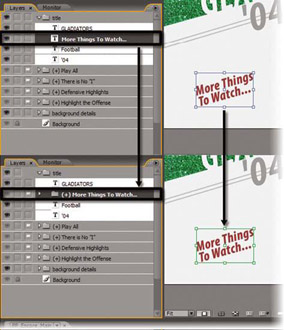
A text object can be converted to a button. The text itself becomes the button; there is no need for other graphics. This technique is often used on multiplemenu DVDs where a link back to the main menu is provided on a sub-menu. For our project, we will create a text button to link from the Main Menu to the Extras Menu and vice-versa. To convert a text object to a button:
Select the text object in the Layers panel.
Click in the empty square just to the left of the text icon. This square is in the Object/Button column of the Layers panel; it is used to convert an object to a button.
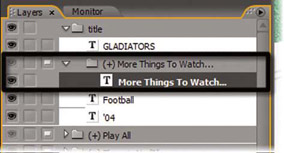
A small, white rectangle appears in the square. The rectangle is called a button icon and it indicates that the layer is now a button.
The text becomes a button
The button icon in the Object/Button column of the Layers panel isn t the only indication that an object is a button. Encore knows which menu objects are buttons by the way that they are named in the Layers panel. In Photoshop-speak, an Encore menu button is a layer set a group of two or more layers that act as a single object. Encore recognizes a layer set as a button only if the layer set has the correct prefix as part of its name. The prefix ( + ) indicates a button layer set.