The Focal Easy Guide to Adobe Encore DVD 2.0

We need to get our project out of the computer and, ultimately, onto disc. That s the focus of this chapter. We ll examine the tools available in Adobe Encore DVD 2.0 that give you options for how best to do that. Whether you need just a few discs for a local client or hundreds of discs for nationwide distribution, Encore can produce the right finished product for the job.
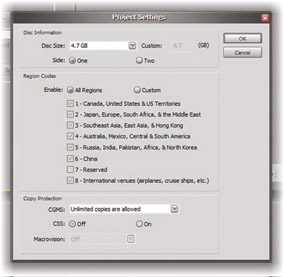
In The Project: Transcoding , we told Encore what size of disc we would be using for our project. That took care of the only project setting that we needed until now. The other project settings are for the Region Code of the disc and for Copy Protection options. Let s take a look at the Project Settings dialog:
Select the tab for the Disc panel to bring it forward in its frame.
Click the Project Settings button.
Verify that the Disc Size is correct for the project.
The Project Settings dialog
Set Region Code and Copy Protection options only if you will build a DVD Master of the project by writing to a Digital Linear Tape drive. These options will only function on discs that are pressed at a replication facility. For a burned disc or a disc image produced by Adobe Encore DVD 2.0, setting these options will have no effect on the finished DVD. All regions will always be enabled and no copy protection will be available.
Every Encore project needs to be checked...