The Focal Easy Guide to Adobe Encore DVD 2.0

At this point in the project, we have assembled all of the content that will be part of the main program and created all of the menus that we will need to allow the audience to navigate around the finished DVD. We ve worked hard designing the menus and creating the timelines, but the menus aren t yet functional and the timelines are not readily available to the audience. Now it s time to hook everything up so that our finished DVD will function according to the plan contained in our flowchart.
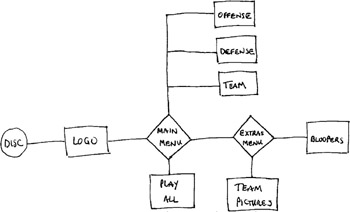
One way to think about what we have done so far and what we have to do next is to take a good look at our flowchart once again.
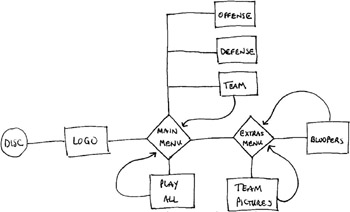
We have created all of the boxed elements of our flowchart. Now we need to create the links between the elements that are represented by the connecting lines in the flowchart. We will also create links that aren t on the flowchart. The function of these omitted links is to create a complete circuit between all of the program content and menus so that the audience doesn t end up at a dead-end. Said another way, the links shown in the flowchart show us how to get to the program content and other menus, but we will need to add the links the get us back to where we started.