Digital Signal Processing Using MATLAB and Wavelets
Chapter 3: Filters

Overview

We are often interested in manipulating a signal. For example, you might turn up the volume on a stereo system, boost the bass (low-frequency sounds), or adjust sounds in other frequency ranges with the equalizer. These examples are not necessarily digital signal processing, since they can also be done with analog parts, but they do serve as examples of ways we might want to change a signal. Filters allow us to change signals in these ways. How does a filter function? Architecturally, how do we make a filter? We will examine these questions and more in this chapter.

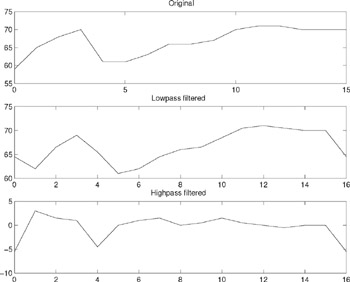
Figure 3.1 (top) shows an example signal, the low temperatures from Chapter 1, "Introduction." In the middle, we see the output from a lowpass filter, i.e., a filter that keeps the low-frequency information. Notice how much it looks like the original. Also, you may see that the filtered version has one more value than the original, owing to the effect of the filter (the number of filter outputs equals the number of inputs plus the number of filter coefficients minus one). The bottom graph on this figure shows the output from a highpass filter, which allows the rapidly changing part of the signal through. We see that most of the points are around zero, indicating little change. However, a visible dip around output 5 shows how the big change between input samples 4 and 5 becomes encoded here.


Figure 3.1: An example signal, filtered.

Shown in Figure 3.2 is...

UNLIMITED FREE
ACCESS
TO THE WORLD'S BEST IDEAS

SUBMIT
Already a GlobalSpec user? Log in.

This is embarrasing...

An error occurred while processing the form. Please try again in a few minutes.

Customize Your GlobalSpec Experience

Category: IC Electronic Filters
Finish!
Privacy Policy

This is embarrasing...

An error occurred while processing the form. Please try again in a few minutes.