Digital Signal Processing Using MATLAB and Wavelets

9.5: Down-Sampling and Up-Sampling

9.5 Down-Sampling and Up-Sampling

The down-sampling operation is easy enough to envision: only the even indexed values are kept. It squeezes the signal to half of its size. The inverse operation, up-sampling, stretches the signal back out, usually by inserting a 0 between each two successive samples. The effect of a down-sampler followed by an up-sampler is that every other value will be 0.

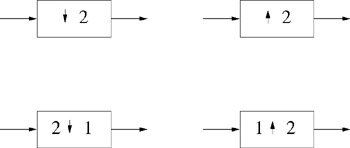
In this text, we show the down-sampler as the arrow followed by the number 2, as in the top left corner of Figure 9.7, and the up-sampler as in the top right corner of the same figure. Alternatively, some texts use the two symbols along the bottom of this figure [35], as in two inputs enter but only one leaves for the down-sampler, and one input enters but two exit the up-sampler.


Figure 9.7: Different ways to indicate down-samplers and up-samplers.

9.5.1 Example Using Down/Up-Samplers

Intuitively, using up- and down-samplers may seem like it cannot work. How can we throw out half of our calculations after filtering without losing information? This section gives a brief example of how this process works.

Figure 9.8 shows an example of a two-channel filter bank with down-samplers followed by up-samplers. The filters are very simple, in fact, these filters would be implemented as in Figure 8.2, which reduces down to Figure 8.3.


Figure 9.8: A simple filter bank demonstrating down/up-sampling.

Since the filter with coefficients {1, 0} allows the input to pass through to the output, we...

UNLIMITED FREE
ACCESS
TO THE WORLD'S BEST IDEAS

SUBMIT
Already a GlobalSpec user? Log in.

This is embarrasing...

An error occurred while processing the form. Please try again in a few minutes.

Customize Your GlobalSpec Experience

Category: Powder Thieves and Powder Samplers
Finish!
Privacy Policy

This is embarrasing...

An error occurred while processing the form. Please try again in a few minutes.