Excel 2007 for Scientists and Engineers

With examples from the world of science and engineering, this reference shows scientists the tips and techniques of Excel and how to tailor them specifically to their experiments, designs, and research.
 TABLE OF CONTENTS
 To make record keeping easier, it may be wise to implement a good numbering system for each row or record. You need to know about some of Excel's good tools and functions before you take on your table's numbering system.
Figure 2.1 provides an overview of Excel's rounding functions. In the value view of the sheet (vs. formula view), if you press F9, all numbers in the top row change after each click because the function RAND is used in the first row. Also, all the rounding functions change accordingly but they all do different things: Some always round down; others round toward 0, depending on whether they are in the positive or negative range; and so on.
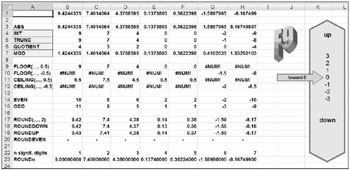
This chapter focuses on four of the rounding functions:
INT: This function returns the integer part of a number but rounds down; for example, INT(7/2) returns 3, and INT(-7/2) returns -4.
TRUNC: This function returns the integer part of a number but rounds toward 0; for example, TRUNC(7/2) returns 3, and TRUNC(7/2) returns -3.
QUOTIENT: This function returns the integer...