LabVIEW Graphical Programming, Fourth Edition
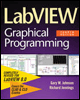
Written in a highly accessible and readable style, this book illustrates basic LabVIEW programming techniques as well as advanced programming concepts.
 TABLE OF CONTENTS
 A LabVIEW instrument driver is a collection of VIs that controls a programmable instrument. Each routine handles a specific operation such as reading data, writing data, or configuring the instrument. A well-written driver makes it easy to access an instrument because it encapsulates the complex, low-level hardware setup and communications protocols. You are presented with a set of driver VIs that are easy to understand, modify, and apply to the problem at hand.
The key to writing drivers lies in a simple pronouncement: RTM Read The Manual. We're talking about the programming manual that goes with the instrument you're writing the driver for and the online Application Note Developing LabVIEW Plug and Play Instrument Drivers. Without these references, you may end up frustrated or, at best, with a really bizarre driver. The guidelines on writing drivers, complete instrument drivers, as well as many development tools are gathered online at the Instrument Driver Network (ni.com/idnet). National Instruments (NI) has made it exceptionally simple to create full-featured plug-and-play instrument drivers with the new Instrument Driver Project Wizard in LabVIEW 8. We'll cover communication basics in this chapter and the Wizard in Chapter 11. Communicating with an instrument is more than just having a set of VIs.
One reason that LabVIEW has been so widely accepted is because of the way it incorporates instrument drivers. Unlike in many competing applications, LabVIEW drivers are written in LabVIEW complete with the usual panels and diagrams instead of arriving...