Project Planning & Scheduling Using Primavera Contractor Version 4.1: For the Construction Industry
Resources are assigned directly to activities.
To assign a Resource to an activity:
Select the activity to be assigned the Resource,

Click on the
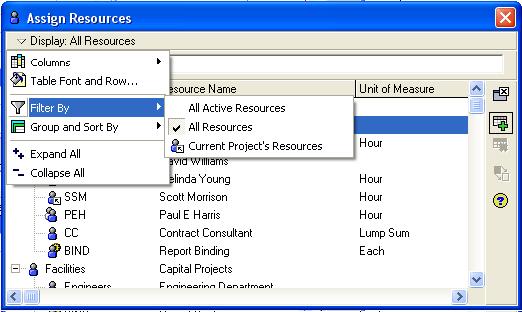
button to open the Assign Resource form,
Click on the Display: menu and select Filter By and then select from the three options which resources you wish to display in the Assign Resources form,
To assign the Resource either:
Double-click on the Resource, or
Click on the
button.
You may now edit the hours or Units/Time Period for each resource.
Before you remove a Resource from an activity that has more than one resource assigned to it, you must be aware of your Resource Assignment preferences. These preferences determine if the total number of Units assigned to the activity (or work) will be reduced or remain constant.
To remove a resource, select the Resource in the Bottom Pane Resource tab and either:
Strike the Del key, or
Click on the
button.
The option in the Projects Properties form, Resources tab under the Resources Assignments heading allows a resource to be assigned more than once to an activity. A resource could be assigned to work at the start of an activity and then in conjunction with Resource Lag work...