Project Planning and Scheduling Using Primavera Version 4.1: For Engineering & Construction and Maintenance & Turnaround

10 Activity Network View

Overview

The Activity Network, also knownas the PERT View, displays activities as boxes connected by therelationship lines. See below:

This chapter will not cover this subject in detail but will introduce the main features.

Many features available in the Gantt Chart View are alsoavailable in the Activity Network View, including:

Topic

Menu Command

  • Viewing a Project Using the Activity Network View

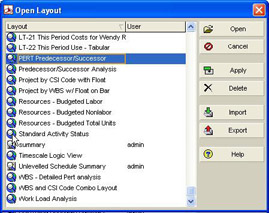
  • Select View, Layout, Open ,

  • Click on the Layout Options bar, just below the Activities toolbar on the left hand side of the screen, and select Layout, Open ,

  • Select View, Show on Top, Activity Network, or

  • Click on the button on the Activitiestoolbar.

  • Adding and Deleting Activities in the Activity NetworkView

  • Use the Add and Deletekeys, or

  • Use the menu commands Edit, Addand Delete.

  • Adding, Editing and Deleting Relationships

  • Graphically drag from one activity to another, or

  • Use the Predecessor and Successor tabs in the Activity Details form.

  • Formatting the Activity Boxes

  • Select View, Activity Network, Activity NetworkOptions , or

  • Right-click in the Activity Network area and select Activity Network Options .

10.1 Viewing a Project Using the Activity NetworkView

  • Select View, Layout, Open , or

  • Click on the Layout Options bar, just below the Activities toolbar on the left hand side of the screen and select Layout, Open .

  • Then select an Activity Network Layout, for example the 02 PERTPredecessor/Successor, from the drop down list.

10.2 Adding, Deleting and Dissolving Activities...

UNLIMITED FREE
ACCESS
TO THE WORLD'S BEST IDEAS

SUBMIT
Already a GlobalSpec user? Log in.

This is embarrasing...

An error occurred while processing the form. Please try again in a few minutes.

Customize Your GlobalSpec Experience

Category: Computer-Aided Design (CAD) Services
Finish!
Privacy Policy

This is embarrasing...

An error occurred while processing the form. Please try again in a few minutes.