Project Planning and Scheduling Using Primavera Version 4.1: For Engineering & Construction and Maintenance & Turnaround

Workshop 15: Assigning Roles and Resources to Activities

Workshop 15: Assigning Roles and Resources to Activities

Background

The Resources and roles must now beassigned to their specific activities.

Assignment

Open the OzBuild with Resources project non-statused and complete the following steps.

  1. In the Activities Workspace display the Gantt Chart in the top view and Resourcestab of the Activities Details form in the bottom view.

  2. Open the User Preferences form:

    • Select the Ca l culations tab and set the Resource Assignments option to Preserve theUnits, Duration, and Units/Time for existing assignments.

    • Select the Time U nits tab and set the Units/time option to units/duration (4h/d)and the Units Format, Units ofTime to Hours with 2 DecimalPlaces.

    1. Format the Resources tab with the columns shown below and assign the following Roles to theActivities using the button:

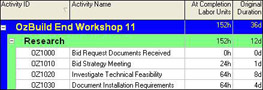
    2. When the Activity table is formatted as below the following values should be shown:

    3. Assign the following Resources to the Roles using the button:

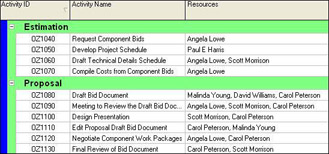
    4. Assign the following Resources to the Activities using the button:

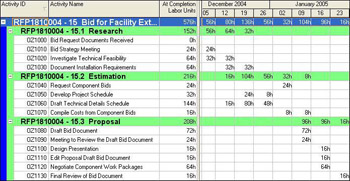
    5. In the top view display the Activity Usage Spreadsheet by selecting View, Show on Top, Activity Usage Spreadsheet. Reformat the columns to show the At Completion Labor Units column and check that your results matchthose below:

UNLIMITED FREE
ACCESS
TO THE WORLD'S BEST IDEAS

SUBMIT
Already a GlobalSpec user? Log in.

This is embarrasing...

An error occurred while processing the form. Please try again in a few minutes.

Customize Your GlobalSpec Experience

Category: Tablet Computers
Finish!
Privacy Policy

This is embarrasing...

An error occurred while processing the form. Please try again in a few minutes.