Project Planning and Scheduling Using Primavera Version 4.1: For Engineering & Construction and Maintenance & Turnaround

13 Group, Sort and Layouts

Overview

Group & Sort allows activities to be sorted and organized under other parameters such as Dates and Resources oruser-defined Activity Codes. This function is similar to Organize in P3 and SureTrak and Groupingin Microsoft Project.

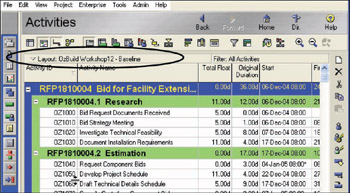
Layouts is a function in which the formatting of parameterssuch as the Group & Sort, Columns and Bars is saved and issimilar to Layouts in P3 and SureTrak or Views in Microsoft Project. A Layout may beedited, saved or reapplied at a later date and may have a Filterassociated with it.

This chapter will cover the following topics:

Topic

Notes on the Function

  • Reformat the Grouping and Sorting of activities by opening the Groupand Sort form:

  • Click on the button, or

  • Select View, Group and Sort .

  • Group and Sort Projects at Enterprise Level

Projects may be Grouped and Sorted at Enterprise level in a similar method to activities in aproject.

  • Create or edit a Layout

Select either:

  • From the menu View, Layout, Save As , or

  • From the Layout bar Layout, SaveAs .

13.1 Group and Sort Activities

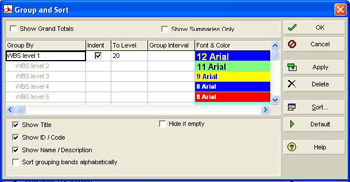
To reformat the Grouping and Sorting of activities the Group and Sortform is opened by:

  • Clicking on the button, or

  • Selecting View, Group andSort .

There are a number of options in this form:

13.1.1 Show Grand Totals

This is the same as inserting a Project band in P3 or SureTrak with Organize or displaying a Project summary task in Microsoft Project.

This displays a...

UNLIMITED FREE
ACCESS
TO THE WORLD'S BEST IDEAS

SUBMIT
Already a GlobalSpec user? Log in.

This is embarrasing...

An error occurred while processing the form. Please try again in a few minutes.

Customize Your GlobalSpec Experience

Category: Collaborative Applications Software
Finish!
Privacy Policy

This is embarrasing...

An error occurred while processing the form. Please try again in a few minutes.