Project Planning and Scheduling Using Primavera Version 4.1: For Engineering & Construction and Maintenance & Turnaround

12 Filters

This chapter covers the ability of Primavera Version4.1 to control which activities are displayed, both on the screen and in printouts, by using Filters.

12.1 Understanding Filters

Primavera Version 4.1 has an ability to display activities that meet specific criteria. Youmay want to see only the incomplete Activities, or the work scheduled for the next couple ofmonths, or the Activities that are in progress.

Primavera Version 4.1 defaults to displaying all activities. It has a number of pre-definedfilters available that you may use or edit. You may also create one or more of your own.

A filter may be applied to display or to highlight only those activities that meet acriteria.

There are three types of filters:

  • Default filters which are supplied with the system and maynot be edited or deleted but may be copied and then edited or modified.

  • Global filters which are made available to anyone working inthe database, and

  • User-Defined filters which are defined by a user andavailable only to that user unless made a Global filter.

Drop down or Auto filters as in Excel and Microsoft Project are not available.

Topic

Menu Command

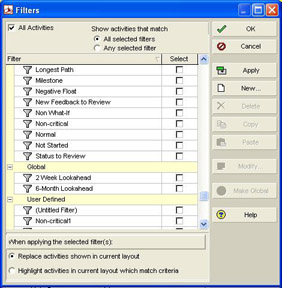
  • To apply, edit, create or delete a filter open the Filters form.

  • Click on the button, or

  • Select View, Filters , or

  • Right-click in the columns area and select Filters .

12.2 Applying a Filter

12.2.1 Filters Form

  • Clicking on the button, or

  • Selecting View, Filters ,or

  • Right-clicking in the columns area and selecting Filters

12.2.2 Applying a Single Filter

UNLIMITED FREE
ACCESS
TO THE WORLD'S BEST IDEAS

SUBMIT
Already a GlobalSpec user? Log in.

This is embarrasing...

An error occurred while processing the form. Please try again in a few minutes.

Customize Your GlobalSpec Experience

Category: Spectral Filters
Finish!
Privacy Policy

This is embarrasing...

An error occurred while processing the form. Please try again in a few minutes.