Object-Oriented Programming for Windows 95 and NT
A beginner to intermediate level guide to object-oriented programming for the Windows 95 and NT platforms.
 TABLE OF CONTENTS
 Labels are fixed items of text that are displayed on windows (Figure 7.10). The text may be changed within a program but not by the user. Labels are used for titles (excluding those in the title bar or the captions on buttons), instructions, and other explanatory text. They are particularly useful when attached to text boxes (used for data entry). The fact that they can be changed by the program means that they can also be set up to display messages (with the label text initially blank) or to show status information. Labels consist of an item of text in a rectangle. There are no special user-activated events for labels.
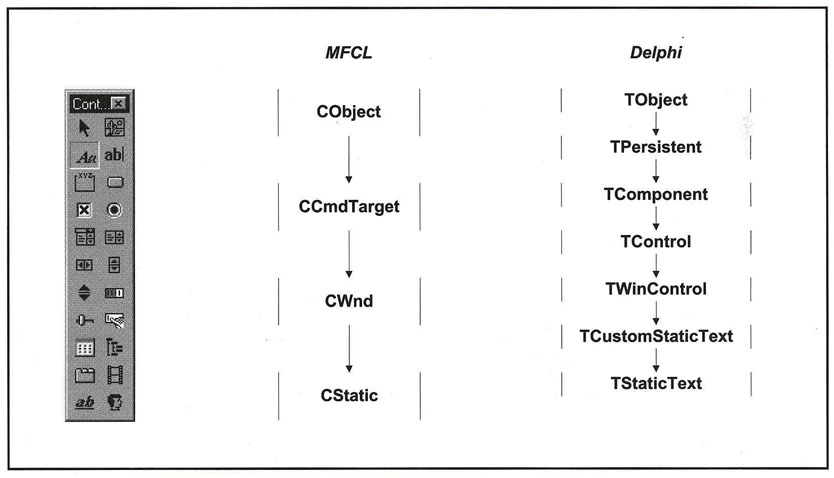
Visual C++ labels are called static text controls and are derived from the CStatic class (itself derived from CWnd). The parameters determine the positions of the text within its rectangle, and the color of the rectangle and its background.
You can use the label tool to put labels on the dialog box. Move the labels to a suitable position by dragging them and make them a suitable size by dragging their sizing handles.
If you need several similar labels you can create the first one and then duplicate it. Use Edit Copy to copy the label to the clipboard and Edit Paste to add further labels. This method ensures that all the labels are the same size. They can be lined up with the grid. (This method can...