Object-Oriented Programming for Windows 95 and NT
A beginner to intermediate level guide to object-oriented programming for the Windows 95 and NT platforms.
 TABLE OF CONTENTS
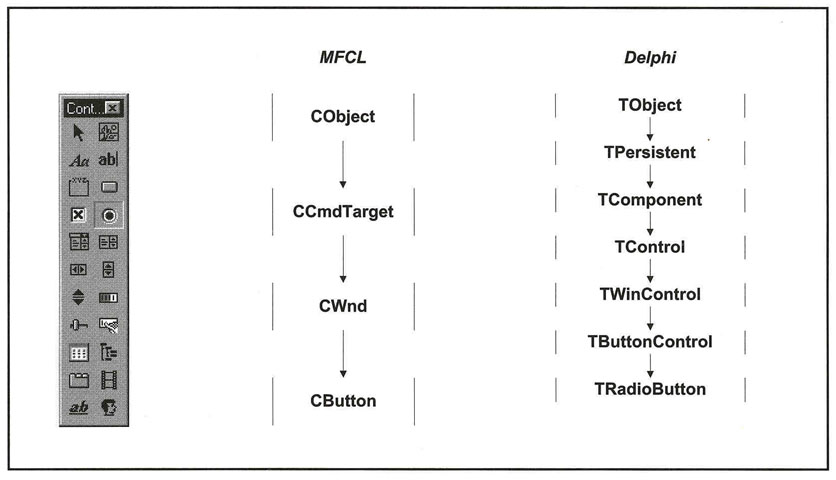
 Radio buttons, also known as option buttons, are a further extension of command buttons (Figure 7.23).
The differences between radio buttons and check boxes are as follows:
The button is symbolized by a circle to the left of the caption. When checked, the button is filled in.
There are only two states: checked and unchecked.
Radio buttons are almost always used in groups.
When a button is clicked, it is checked and all others in the group are unchecked.
Therefore, radio buttons are affected by the same events as check boxes (though behave slightly differently) and have similar methods.
If there is more than one set of radio buttons on a dialog box, they should be grouped together in frames (for details of frames in each environment, see below). In this way, one radio button from each frame will be selected; selecting a different radio button within a frame will not affect the selections in other frames (unless you choose to do so in your event-handling procedures). For more information on frames, see Chapter 6.
Radio buttons in Visual C++ are implemented as part of the CButton class. A button is defined as a radio button by setting one of the BS_RADIOBUTTON or BS_AUTORADIOBUTTON properties.
Developer Studio offers an automatic radio button in the control palette. Radio buttons have similar properties to check boxes (Figure 7.24). The additional properties allow you to change the position of the...