DCOM Explained
The "big picture" of DCOM architecture for system designers and technical managers.
 TABLE OF CONTENTS
 Administration services are, as their name suggests, used by the administrator to install applications and middleware, to configure the applications and middleware itself, to resolve errors, to monitor performance, and to handle faults. DCOM's administration services are part of Windows NT and accessed from the NT menu. The tools available to the administrator cover far more than those associated specifically with DCOM and include Backup facilities (for saving to local tape drives, for example) and a Disk administration utility (to enable the administrator to view and configure partitions on the hard drive).In this chapter, however, we will be looking at those administration services specific to support of DCOM, and we will (as we have done in the other chapters) be looking at the current offerings and the future plans.
Transaction Server, Windows NT, and MSMQ are currently administered using their own Explorer tools. These tools provide cross-platform administration, but not cross-operating system administration. All the tools, as one would expect, are GUI based and include a point-and-click interface with wizards and help.
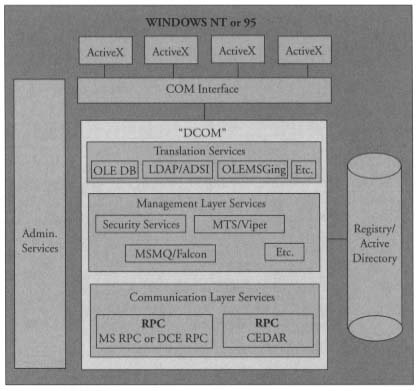
At the moment, the tools are somewhat fragmented. The administrator must go to one set of products to administer one set of software and another set for another type of software. All this is due to change, however, with the introduction of the Microsoft Management Console. In fact, by the time you read this MMC should be released. The Microsoft Management Console is just one of a...