After Effects on the Spot: Time-Saving Tips & Shortcuts From the Pros

Rotation Makes My Head Spin

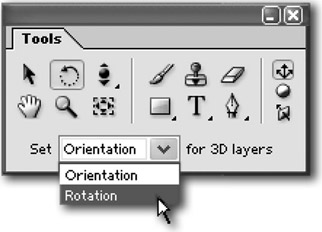
When you want to rotate a 3D layer in the Comp, type W to switch to the Rotation tool. (V will switch you back to the Black Arrow selection tool when you're done.) Then choose Rotation or Orientation from the dropdown menu at the bottom of the Tools Palette.

Rotation is the best choice for animating. Orientation is better for posing. This is because when you keyframe Orientation, it always takes the shortest path between two angles. If you start with a layer rotated 0 degrees and orient it clockwise to 350 degrees, in the final animation, it will rotate counterclockwise from 0 to 350. On the other hand, Rotation remembers which direction you rotated the layer and how many times around you went.

UNLIMITED FREE
ACCESS
TO THE WORLD'S BEST IDEAS

SUBMIT
Already a GlobalSpec user? Log in.

This is embarrasing...

An error occurred while processing the form. Please try again in a few minutes.

Customize Your GlobalSpec Experience

Category: Multi-axis Positioning Systems
Finish!
Privacy Policy

This is embarrasing...

An error occurred while processing the form. Please try again in a few minutes.