After Effects on the Spot: Time-Saving Tips & Shortcuts From the Pros
It's Good to Be Blurry

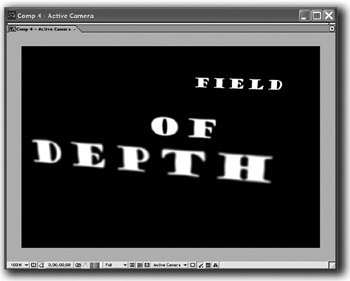
Perhaps the coolest feature of AE's 3D cameras is the Depth of Field option. This makes objects out of a camera's range (too close or too far) appear blurred, just as they would with a real camera.

  1. To try it out, press Cmd+Option+C (Ctrl+Alt+C), or, if you want to be ordinary, choose Layer>New>Camera from the menu.

  2. In the New Camera dialogue, select a narrow angle preset, like 80mm (the larger the mm number, the narrower the angle-small numbers are for wide-angle lenses).

  3. Also, make sure the Depth of Field option is enabled. In the Timeline, you can adjust the strength of the Depth of Field effect by twirling open the camera layer, then twirling open the Options and adjusting the Blur Level.

UNLIMITED FREE
ACCESS
TO THE WORLD'S BEST IDEAS

SUBMIT
Already a GlobalSpec user? Log in.

This is embarrasing...

An error occurred while processing the form. Please try again in a few minutes.

Customize Your GlobalSpec Experience

Category: High Speed Cameras
Finish!
Privacy Policy

This is embarrasing...

An error occurred while processing the form. Please try again in a few minutes.