After Effects on the Spot: Time-Saving Tips & Shortcuts From the Pros

Try Seeing Things from My View

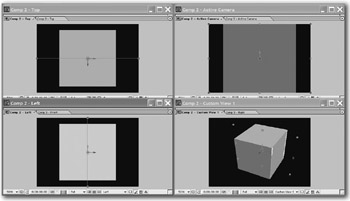
In full-fledged 3D programs like 3D Studio Max and Maya, you can see several views at once: top, left, front and perspective. You can do the same thing in After Effects!

  1. After adding some 3D layers to your Comp, choose View>New View.

  2. A new tab will appear in the Comp window. Drag the tab away from the Comp window until it becomes a second, floating Comp window.

  3. Set the camera view in this window to Top, and arrange two comp views any way you like.

  4. Go to View>New View two more times and create two more floating Comp windows with camera views Left and Front.

  5. Finally, choose Window>Workspace>Save Workspace. When AE prompts you for a name, type Four 3D Views. From now on, any time you want to bring up a Maya-like interface, you can choose Window>Workspace>Four 3D Views.

UNLIMITED FREE
ACCESS
TO THE WORLD'S BEST IDEAS

SUBMIT
Already a GlobalSpec user? Log in.

This is embarrasing...

An error occurred while processing the form. Please try again in a few minutes.

Customize Your GlobalSpec Experience

Category: Window Treatments
Finish!
Privacy Policy

This is embarrasing...

An error occurred while processing the form. Please try again in a few minutes.