After Effects on the Spot: Time-Saving Tips & Shortcuts From the Pros
Chapter 14: AE and DVD Creating Still and Motion Menus with After Effects

Overview

It's amazing what we can do with personal computers these days. Not only can we create original material, but also we now have complete control from concept to distribution.

Back in 1999 (cue sepia-toned memories), once we had edited a video or created an animation we had to output to tape. Now we can output beautiful digital quality without having to worry about generation loss.

Do you know that you can design menus and overlays right in After Effects? Whether you're creating DVD's for training purposes or distributing your latest film, this chapter will teach you to work efficiently with AE and your DVD authoring application.

Overlays from AE

If you designed a menu in AE, and also need a highlight layer, here's what to do.

  1. Go to an appropriate frame and choose Composition>Save Frame As>Photoshop Layers.

  2. Open the file in Photoshop.

  3. Turn off the visibility icon for all layers which are not part of the Overlay

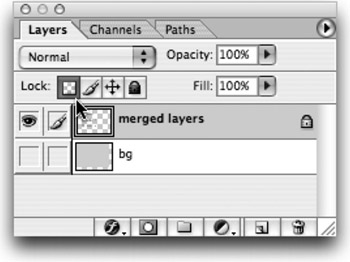
  4. Select one of the visible layers, and choose Merge Visible from the layer palette submenu.

  5. Lock the transparency for this new merged layer by clicking on the Lock transparent pixels box.

  6. Choose Edit>Fill and fill with Black (or White, depending on your DVD application).

  7. Create a new Empty layer and place it in the background.

  8. Select All and Fill this layer with White (or Black, again depending on your DVD application.

  9. Delete any unused layers.

  10. Choose File>Save As and save a flattened PICT or TARGA file to create an overlay layer. Again,...

UNLIMITED FREE
ACCESS
TO THE WORLD'S BEST IDEAS

SUBMIT
Already a GlobalSpec user? Log in.

This is embarrasing...

An error occurred while processing the form. Please try again in a few minutes.

Customize Your GlobalSpec Experience

Category: Overlays and Veneers
Finish!
Privacy Policy

This is embarrasing...

An error occurred while processing the form. Please try again in a few minutes.