After Effects on the Spot: Time-Saving Tips & Shortcuts From the Pros

Smile, You're on Orbiting Camera!

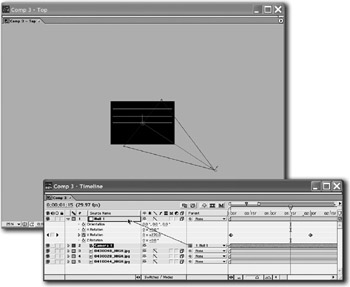
Generally, to make one layer orbit around another, you drag the orbiting layer's Anchor Point onto the center of the layer it's orbiting around and animate Rotation. Alas, you can't do this with cameras, because they don't have Anchor Points.

But you can fashion a fake Anchor Point for your camera by using a Null Object and a little parenting.

  1. To create the Null Object, choose Layer>New>Null Object. Null Objects are layers that don't render.

  2. Turn on your Null's 3D switch and place it at the point you want the camera to rotate around (i.e., in the center of your 3D scene).

  3. Then animate the Null rotating in a complete circle (keyframe its X, Y or Z Rotation property).

  4. Finally, parent the camera to the Null and you'll get a lovely orbiting camera.

Optionally, you can animate the camera's position to make it gradually move closer to the Null as it orbits. That will give you a spiraling camera.

UNLIMITED FREE
ACCESS
TO THE WORLD'S BEST IDEAS

SUBMIT
Already a GlobalSpec user? Log in.

This is embarrasing...

An error occurred while processing the form. Please try again in a few minutes.

Customize Your GlobalSpec Experience

Category: Satellites
Finish!
Privacy Policy

This is embarrasing...

An error occurred while processing the form. Please try again in a few minutes.