After Effects on the Spot: Time-Saving Tips & Shortcuts From the Pros

The Path to Righteousness in 3D

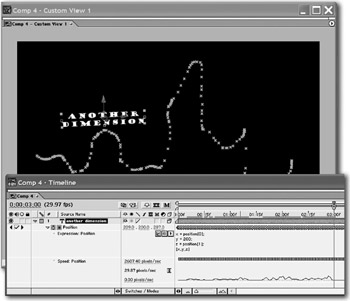
By adding a simple expression to a layer's Position property, you can turn a 2D motion path into a 3D motion path.

First create the path via keyframing, pasting a path from Illustrator, or using Motion Sketch. Then turn on the layer's 3D switch, and add the following expression to its Position property:

  • X = position[0];

  • Y = 200;

  • Z = position[1];

  • [X,Y,Z]

Command (Control). Scrub at a slower speed when adjusting values.

Shift. Change scrubbing at a higher value.

When the layer was 2D, the path moved it around the X and Y dimensions. This expression will change movement to the X and Z dimensions. Whenever it formerly moved up and down (Y), it will now move in and out (Z). Its up and down movement will be constrained to 200 pixels from the top of the Comp window. Change the number 200 if you want the Y position to be elsewhere. If you want the movement to occur in the Y and Z axes, change the expression to the following:

  • X = 200;

  • Y = position[1];

  • Z = position[0];

  • [X,Y,Z]

UNLIMITED FREE
ACCESS
TO THE WORLD'S BEST IDEAS

SUBMIT
Already a GlobalSpec user? Log in.

This is embarrasing...

An error occurred while processing the form. Please try again in a few minutes.

Customize Your GlobalSpec Experience

Category: CNC Routers
Finish!
Privacy Policy

This is embarrasing...

An error occurred while processing the form. Please try again in a few minutes.