After Effects on the Spot: Time-Saving Tips & Shortcuts From the Pros

Chapter 15: How to Beat the Render Queue Advanced Render Strategies to Save Time

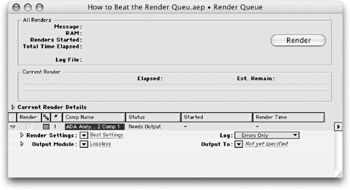
Welcome to the finish line or the end of the road. This is where your good ideas and hard work bear results. Inside the Render Queue is where your motion graphics come to life. But birth can be painful, or easy, it all depends on your approach.

This chapter will share several secrets to gain back time and achieve consistent results with your render. By harnessing templates and After Effects' powerful media management abilities, your graphics will come to live faster (and with fewer errors). Stop wasting time and get the results you need, faster!

Quick Path to Consistency

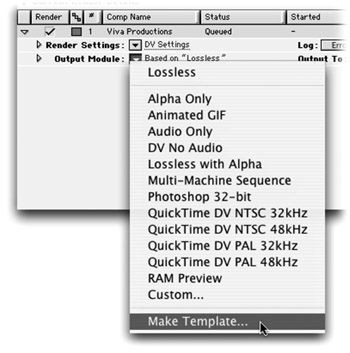
You've gone through all the trouble to set up your render and tweak your render and output settings. Now save those custom settings for future use.

  1. Click on the render settings or Output Module pop-up menu.

  2. Choose Make Template from the list.

Be Consistent

Want consistent results? Use templates. After Effects comes with several built-in templates that addresses several of the more common production needs. After Effects offers both render setting templates (for establishing quality, resolution, and duration) and output module (for defining file formats). If these built-in options don't do it for you however, you can easily create your own.

  1. Choose Edit > Templates> Render Settings or Output Module .

  2. Click New to create a new setting or Duplicate to modify a copy of an existing setting.

  3. Modify the settings to match your needs. When finished click OK.

  4. If you'd like, you can choose one...

UNLIMITED FREE
ACCESS
TO THE WORLD'S BEST IDEAS

SUBMIT
Already a GlobalSpec user? Log in.

This is embarrasing...

An error occurred while processing the form. Please try again in a few minutes.

Customize Your GlobalSpec Experience

Category: Video Cards
Finish!
Privacy Policy

This is embarrasing...

An error occurred while processing the form. Please try again in a few minutes.