Animating with Microstation
For architects and engineers who deal with 3D rendering and animations, this text covers every aspect of animating in detail, including cameras, paths, actors, motion blurs, global and source lighting, and targets.
 TABLE OF CONTENTS
 Looking at the preview from the previous exercise, you can see that the camera passes around the high-rise roughly between frames 130 and 170. The camera passes around the lighthouse between frames 440 and 460.
The plan is for the camera to move along the path you created earlier. Looking initially at the high-rise building at frame 0, the focus or target can be scripted or set into motion to move to the fountain as the camera moves toward the high-rise at about frame 100. As the camera comes around the high-rise, the target can be moved out to the lighthouse and remain there until the camera approaches at about frame 450. The target can then be moved back to the fountain so that at the end of the animation the focus will be back on the fountain.
Right-click the Type Camera item in the Animation Producer dialog box and select Enable from the options.
Double-click the Highrise keyframe in the Animation KeyFrames dialog box.
In the Script KeyFrame dialog box, enter 0 for the Frame Number and click OK.
The KeyFrame item displays in the Animation Producer script. The camera now focuses on the high-rise at frame zero.
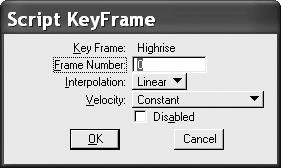
Double-click the Highrise keyframe in the Animation KeyFrames dialog box.
In the Script KeyFrame dialog box, enter 100 in the Frame Number field, verify that Interpolation is Linear, and Velocity is Constant. Click OK to add this...