AutoCAD 2008 Essentials

Using both English and metric units to illustrate the myriad drawing and editing tools for AutoCAD, this text includes 21 workshops that cover the basics, and complete small projects from concept through actual plotting.
 TABLE OF CONTENTS
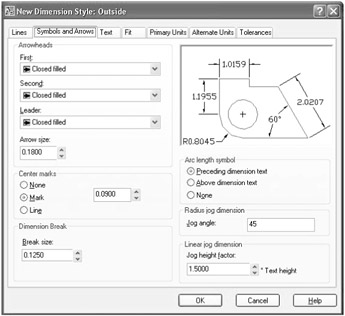
 Click the Symbols and Arrows tab and you will see the following:
Under Arrowheads you can control the following settings:
The shape of the First arrowhead.
The shape of the Second arrowhead.
The shape of the arrowhead to be used in the Leader.
The Size of the arrowhead.
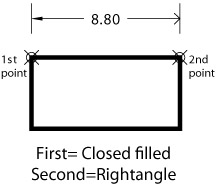
NOTE If you change the first, the second will change automatically, but if you change the second the first will not change.
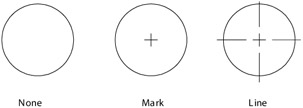
Under Center marks you can control the following settings:
Select whether to show the Center mark or not, or to show centerlines.
Set the Size of the Center mark.
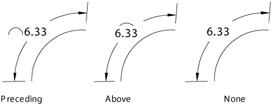
Under Arc length symbol you can control whether to show the symbol Preceding the dimesion text, Above the dimesion text, or None. Check the illustration below:
Under Dimension Break, set the Break size, which is the width of the break of the dimension lines in a dimension break.
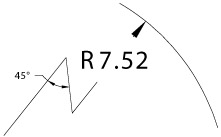
Under Radius dimension jog, set the value of the Jog angle. See the illustration below:
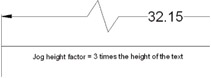
Under Linear Jog dimension, set the Jog height factor as a percentage of the of the text height. See the illustration below.