AutoCAD 2008 Essentials

Using both English and metric units to illustrate the myriad drawing and editing tools for AutoCAD, this text includes 21 workshops that cover the basics, and complete small projects from concept through actual plotting.
 TABLE OF CONTENTS
 One of the cases users may face is: You need a dimension style identical to almost all types of dimensions except for Diameter, which you want a little bit different.
In the above case, we create a dimension style for all types (we call Parent), then we create a child dimension style from it.
Follow the following procedure:
Create your parent dimension style.
Select it from the list in the dimension style dialog box.
Click the New button to create a new style.
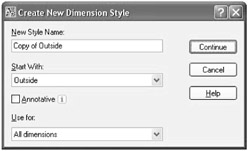
The following dialog box will appear:
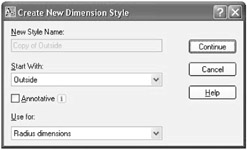
For Use for select Radius (as an example). The dialog box will change to:
Now click Continue and make the changes you want. These changes will affect only the Radius dimensions.
In the Dimension Style dialog box you will see something like: