Introduction to Simulink with Engineering Applications
This chapter is an introduction to Simulink. This author feels that we can best introduce Simulink with a few examples. Tools for simulation and model-based designs will be presented in the subsequent chapters. Some familiarity with MATLAB is essential in understanding Simulink, and for this purpose, Appendix A is included as an introduction to MATLAB.
The MATLAB and Simulink environments are integrated into one entity, and thus we can analyze, simulate, and revise our models in either environment at any point. We invoke Simulink from within MATLAB. We begin with a few examples and we will discuss generalities in subsequent chapters. Throughout this text, a left justified horizontal bar will denote the beginning of an example, and a right justified horizontal bar will denote the end of the example. These bars will not be shown whenever an example begins at the top of a page or at the bottom of a page. Also, when one example follows immediately after a previous example, the right justified bar will be omitted.
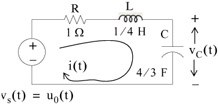
For the circuit of Figure 1.1, the initial conditions are i L(0 -) = 0, and v c(0 -) = 0.5 V. We will compute v c(t).
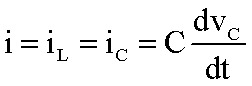
For this example,
| (1.1) | |
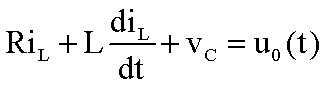
and by Kirchoff's voltage law (KVL),
| (1.2) | |
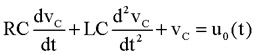
Substitution of (1.1) into (1.2) yields
| (1.3) | |
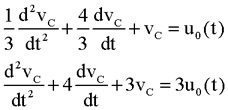
Substituting the values of the circuit constants and rearranging we get:
| (1.4) | |
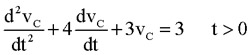
| (1.5) | |
To appreciate Simulink's...