Introduction to Simulink with Engineering Applications
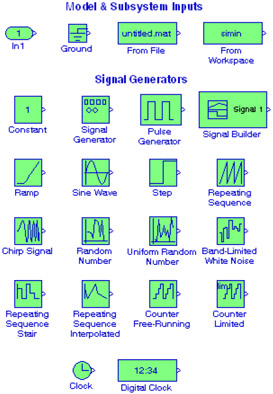
This chapter is an introduction to the Sources library. This is the fourteenth library in the Simulink group of libraries and consists of two sub-libraries, the Model & Subsystem Inputs Sub-Library, and the Signal Generators Sub-Library blocks shown below. We will describe the function of each block included in this library and we will perform simulation examples to illustrate their application.

The Models and Subsystems Inputs Sub-Library contains the blocks described in Subsections 15.1.1 through 15.1.4 below.
The Inport block creates an input port for a subsystem or an external input. This block is described in Section 2.1, Chapter 2, Page 2 2.
The Ground block grounds an unconnected input port. This block is described in Section 2.2, Chapter 2, Page 2 4.
The From File block outputs data read from a MAT file. The name of the file is displayed inside the block. An example using the From File and the To File blocks was presented in Subsection 14.1.3, Chapter 14, Page 14 2.

The From Workspace block reads data from the MATLAB workspace. The workspace data are specified in the block's Data parameter via a MATLAB expression that evaluates to a 2-D array.
For the model of Figure 15.1, the MATLAB workspace contains the statement
t=1:10; u=log10(t);
In the Display block, the first 10 values are...