Introduction to Simulink with Engineering Applications
Chapter 16: The User-Defined Functions Library

Overview

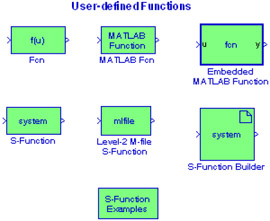
This chapter is an introduction to the User-Defined Functions Library. This is the fifteenth library in the Simulink group of libraries and contains the blocks shown below. We will describe the function of each block included in this library and we will perform simulation examples to illustrate their application.

16.1 The Fcn Block

The Fcn block applies a specified expression to its input denoted as u. If u is a vector, u(i) represents the ith element of the vector; u(1) or u alone represents the first element. The specified expression can consist of numeric constants, arithmetic operators, relational operators, logical operators, and the math functions abs, acos, asin, atan, atan2, ceil, cos, cosh, exp, fabs, floor, hypot, In, log, log10, pow, power, rem, sgn, sin, sinh, sqrt, tan, and tanh.

Example 16.1

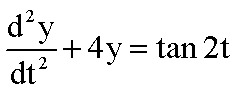
It can be shown that the solution of the differential equation

(16.1)

is

(16.2)

where the constants k 1 and k 2 can be evaluated from the initial conditions. Then we can compute and display any value of y by specifying t, k 1, and k 2, using the model shown in Figure 16.1.


Figure 16.1: Model for Example 16.1

For the model of Figure 16.1 we specified u(1) = t = ?/6, u(2) = k 1 = -1, u(3) = k 2 = -3, and in MATLAB's Command window we entered:

u(1)=pi/6; u(2)=-1; u(3)=-3;y=-(1/4)*cos(2*u(1))*log(sec(2*u(1))+tan(2*u(1)))+v(2)*cos(2*u(1))+v(3)*cos(2*u(1));

16.2 The MATLAB Fcn Block

The MATLAB Fcn

UNLIMITED FREE
ACCESS
TO THE WORLD'S BEST IDEAS

SUBMIT
Already a GlobalSpec user? Log in.

This is embarrasing...

An error occurred while processing the form. Please try again in a few minutes.

Customize Your GlobalSpec Experience

Category: CompactPCI Extenders and PXI Extenders
Finish!
Privacy Policy

This is embarrasing...

An error occurred while processing the form. Please try again in a few minutes.