Introduction to Simulink with Engineering Applications
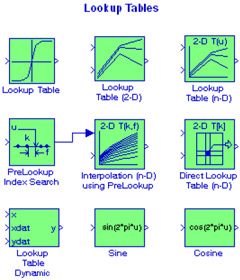
This chapter is an introduction to the Lookup Tables library. This is the sixth library in the Simulink group of libraries and contains the blocks shown below. We will describe the function of each block included in this library and we will perform simulation examples to illustrate their application.


The Lookup Table block computes an approximation to a function y = f( x) where the data vectors x and y are given, and it is required that the x data vector must be monotonically increasing. Moreover, the length of the x and y data vectors must be the same. Please refer to the Help menu for this block for additional information. The Lookup Table icon displays a graph of the input vector versus the output vector. When a parameter is changed on the Block Parameters dialog box, the graph is automatically redrawn when we click on the Apply button.
To define a table, we specify the Vector of input values parameter as a 1 n vector and the Vector of output values parameter as another 1 n. The block generates output based on the input values using one of these methods selected from the Look-up method parameter list:
| 1. | Interpolation-Extrapolation | This is the default method; it performs linear interpolation and extrapolation of the inputs. |
| If a value matches the block's input, the output is the corresponding element in the... |