Introduction to Simulink with Engineering Applications
2.2: The Ground Block

2.2 The Ground Block

The Ground block can be used to connect blocks whose input ports are not connected to other blocks. If we run a simulation with blocks having unconnected input ports, Simulink issues warning messages. Using Ground blocks to ground those blocks avoids warning messages. The Ground block outputs a signal with zero value. The data type of the signal is the same as that of the port to which it is connected.

Example 2.2

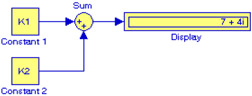
Let us consider the model shown in Figure 2.4 where K1 = 3 + j1 and K2 = 4 + j3 and these values have been specified in MATLAB's Command Window. Upon execution of the Simulation start command, the sum of these two complex numbers is shown in the Display block.


Figure 2.4: Display of the sum of two complex numbers for Example 2.2

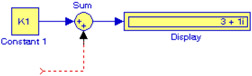
Next, let us delete the block with the K2 value and execute the Simulation start command. The model is now shown as in Figure 2.5.


Figure 2.5: Model for Example 2.2 with Block K2 deleted.

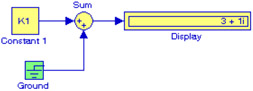
Now, let us add the Ground block at the unconnected input of the Sum block and execute the Simulation start command. The model is now shown as in Figure 2.6.


Figure 2.6: Model of Figure 2.5 with a Ground block connected to the Sum block

UNLIMITED FREE
ACCESS
TO THE WORLD'S BEST IDEAS

SUBMIT
Already a GlobalSpec user? Log in.

This is embarrasing...

An error occurred while processing the form. Please try again in a few minutes.

Customize Your GlobalSpec Experience

Category: Terminal Blocks
Finish!
Privacy Policy

This is embarrasing...

An error occurred while processing the form. Please try again in a few minutes.