Introduction to Simulink with Engineering Applications
The Sum block is an implementation of the Add block which is described in Subsection 8.1.2, Chapter 8. This block performs addition or subtraction on its inputs. This block can add or subtract scalar, vector, or matrix inputs. From the parameters dialog box we can choose the icon shape of the block, rectangular or round. We specify the operations of the block with the List of Signs parameter. Plus (+), minus (-), and spacer () characters indicate the operations to be performed on the inputs. If there are two or more inputs, then the number of characters must equal the number of inputs. For example, "+ - +" requires three inputs and configures the block to subtract the second (middle) input from the first (top) input, and then add the third (bottom) input.
Let us consider the matrices A, B , and C defined in MATLAB's Command Window as:
A=[3+4j 1+0j 5-2j; 2-3j 4+j 7-4j; 1+6j 8-5j 4+7j];B=[4+3j 0+2j -2+5j; -3+2j 6+7j -3-4j; 1+8j -5-3j 2-7j];C=[-2+3j 7+2j -5-2j; 3-2j 4-7j -4+3j; -3+8j 7-4j -6+9j];
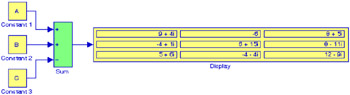
The model in Figure 2.19 performs the operation A + B - C.