Introduction to Simulink with Engineering Applications

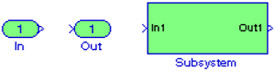
Inport blocks are ports that serve as links from outside a system into the system. Outport blocks are output ports for a subsystem. A Subsystem block represents a subsystem of the system that contains it. As our model increases in size and complexity, we can simplify it by grouping blocks into subsystems. As we can see from Example 1.3 in Chapter 1, if we increase the number of the simultaneous equations, this model increases in size and complexity.
To create a subsystem before adding the blocks it will contain, we add a Subsystem block to the model, then we add the blocks that make up the subsystem. If the model already contains the blocks we want to convert to a subsystem, we create the subsystem by grouping the appropriate blocks.
Figure 2.1 shows the model of Example 1.1, Figure 1.12 in Chapter 1. We will create a subsystem by grouping all blocks except the Step and the Scope blocks.
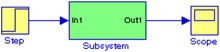
As a first step, we enclose the blocks and connecting lines that we want to include in the subsystem within a bounding box. This is done by forming a rectangle around the blocks and the connecting lines to select them. Then, we choose Create Subsystem from the Edit menu, and Simulink replaces the selected blocks and connecting lines with a Subsystem block as shown in Figure 2.2.