Introduction to Simulink with Engineering Applications

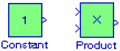
The Constant block is used to define a real or complex constant value. This block accepts scalar (1 1 2-D array), vector (1-D array), or matrix (2-D array) output, depending on the dimensionality of the Constant value parameter that we specify, and the setting of the Interpret vector parameters as 1-D parameter. The output of the block has the same dimensions and elements as the Constant value parameter. If we specify a vector for this parameter, and we want the block to interpret it as a vector (i.e., a 1-D array), we select the Interpret vector parameters as 1-D parameter; otherwise, the block treats the Constant value parameter as a matrix (i.e., a 2-D array).
By default, the Constant block outputs a signal whose data type and complexity are the same as that of the block's Constant value parameter. However, we can specify the output to be any supported data type supported by Simulink, including fixed-point data types. For a discussion on the data types supported by Simulink, please refer to Data Types Supported by Simulink in the Using Simulink documentation.
The Product block performs multiplication or division of its inputs. This block produces outputs using either element-wise or matrix multiplication, depending on the value of the Multiplication parameter. We specify the operations with the Number of inputs parameter. Multiply(*) and divide (/) characters indicate the operations to be performed on the inputs.
The model is shown in Figure 2.9...