Introduction to Simulink with Engineering Applications

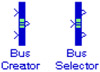
To understand the concept of a signal bus, let us think of several wires held together by tie wraps. Graphically, we can represent a bus as a composite signal comprised of a set of individual signals with a group of lines, each line representing an individual signal. We use Bus Creator blocks to create signal buses and Bus Selector blocks to access the components of a bus. Simulink hides the name of a Bus Creator and Bus Selector blocks when we copy them from the Simulink library to a model. However, we can make the names visible by clicking Show Name on the Format menu. Making the names visible is a good idea since the Bus Creator, Bus Selector, Mux, and Demux blocks are all represented by a heavy vertical line. We will discuss the Mux and Demux blocks in the next section.
The Bus Creator block is normally shown as a heavy vertical line. We use this block to combine a set of signals into a bus, i.e., a group of signals represented by a single line. The Bus Creator block, when used in conjunction with the Bus Selector block, described later also in this section, allows us to reduce the number of lines required to route signals from one part of a diagram to another. This makes our diagram easier to understand.
The model of Figure 2.11 simulates the combined functions sin2t,