Introduction to Simulink with Engineering Applications

The Switch block will output the first input or the third input depending on the value of the second input. The first and third inputs are called data inputs. The second input is called the control input and it is specified on the Function Block Parameters for the Switch block. The following options are available:
u2>=Thresholdu2>Thresholdu2~=0
where u2~=0 indicates a non-zero condition.
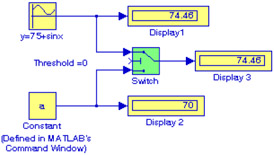
In Figure 2.17, the Function Block Parameters for the Switch block has been set for u2>=Threshold, Threshold= 0, in the Source Block Parameters for the Sine Wave we have entered Amplitude= 1, Bias=75, Frequency =1, and in MATLAB's Command Window we have entered the statement a = 70;
In the model of Figure 2.17, Input 2 satisfies the selected criterion u2>=Threshold where Threshold =0, and thus the Switch block outputs the first input, i.e., y = 75 + sinx.
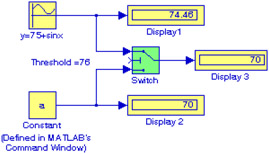
In the model of Figure 2.18, Input 2 does not satisfy the selected criterion u2>=Threshold where Threshold =76, and thus the Switch block outputs the third input, i.e., a = 70.