Learning Mastercam Mill Step by Step

After completing this chapter you will be able to:
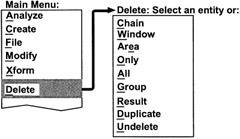
Explain how to delete and undelete existing geometrc entities.
Know how to shorten or extend an existing geometric entity to its intersection (s) with another entity or entities via the Trim command
Explain how to break an existing geometric entity into sparate entities via Break
Understand how to shorten or extend a line or arc entity by a specific ammount via the Extend command.
State the uses of the Xform command for translating, mirroring and rotating existing geometric entities.
State the uses of the Xform command for creating copies of existing geometric entities by translating, mirroring and rotating.
| On CD | ![]() |
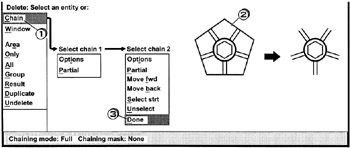
Chain
Deletes all entities connected end to end in a continuous chain.

Click [1] Chain
Click [2] an entity in the desired chain
Click [3] Done
Press Esc to cancel the operation
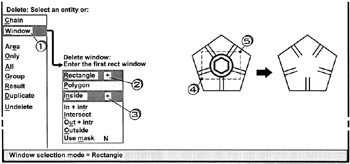
Rectangle Inside +
All entities contained inside a rectangular window clicked are deleted

Click [1] Window
Click [2] Rectangle + activate(+) sign
Click [3] Inside + activate(+) sign
Click [4] [5] the window corners
Press, Esc to cancel the operation
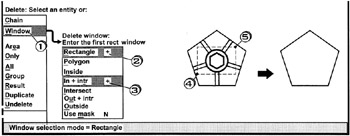
Window Rectangle + In + intr +
All entities contained inside and crossing a rectangular window clicked are deleted

CIick [1] Window
Click [2] Rectangle + activate(+) sign
Click...