Learning Mastercam Mill Step by Step

5-6: Verifying Hole Machining Operations

5-6 Verifying Hole Machining Operations

Mastercam's verifier uses the NCI file to produce the most realistic animation of previously defined machining operations. The part is displayed as a solid model. The operator can see material being removed as the tool moves along a specified toolpath. Verification provides for off line checking or checking that does not cause a CNC machine to be tied up for the job proveout. This reduces possible tool and machine damage, increases the capability of machining a correct part on the first run and thus increases the return on investment for the job.

Example 5-4:

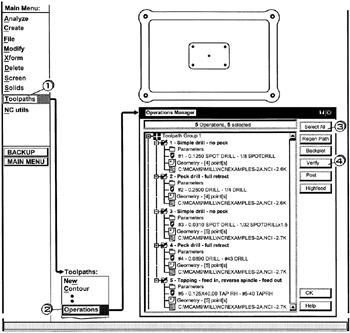
Use the Verify function in the Operations Manager dialog box to generate a proveout run of the drilling tool paths created in Example 5-2.

  • Click [1] Toolpaths

  • Click [2] Operations

  • Click [3] the Select All button

  • Click [4] the verify button

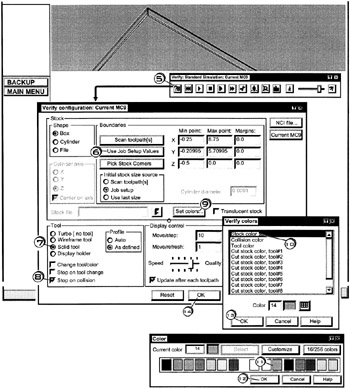
  • Click [5] the Configure button

  • Click [6] Use Job Setup Values

    to make sure the latest job setup values including stock size will be used

  • Click [7] Solid tool radio button

  • Click [8] a check in Stop on Collision

  • Click [9] the Set colors button

  • Click [10] the Stock color

  • Click [11] the desired stock color

  • Click [12] the OK button

  • Click [13] the OK button

  • Click [14] the OK button

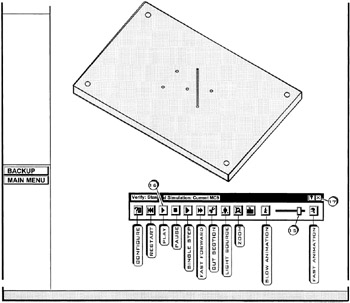
  • Click [15] on the animation speed bar and drag it to a desired speed

  • Click [16] the play button

UNLIMITED FREE
ACCESS
TO THE WORLD'S BEST IDEAS

SUBMIT
Already a GlobalSpec user? Log in.

This is embarrasing...

An error occurred while processing the form. Please try again in a few minutes.

Customize Your GlobalSpec Experience

Category: Production Machining
Finish!
Privacy Policy

This is embarrasing...

An error occurred while processing the form. Please try again in a few minutes.