Learning Mastercam Mill Step by Step

Chapter 6: Profiling and Pocketing in 2d Space

6-1 Chapter Objectives

After completeing this chapter you will be able to:

  1. Know how to create 2D contours for profile machining

  2. Prepare a part for 2D profile machining

  3. Specify contouring parameters in the 2D contouring module

  4. Know how to create 2D contours for pocketing

  5. Specify pocketing parameters in the 2D pocketing module

  6. Explain how to backplot contouring and pocketing toolpaths

  1. State how to use Mastercam's verifier to produce solid model playback animations of contouring and pocketing machining.

  1. Understand how to generate word address part programs via Mastercam's post processing module

6-2 Creating a 2D Contour for Profiling

On CD

A set of lines, arcs and or splines connected end to end can be joined together into a single curve called a machining contour. When Mastercam is directed to contour a part it does so by moving the cutting tool along a previously defined contour. The various methods of creating a contour are described below.

Creating Contours

Chain

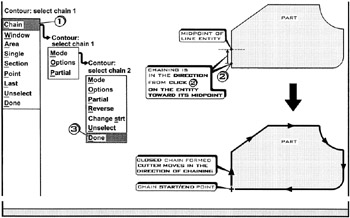
The operator clicks the chain start point on an entity. Chaining will proceed from the start point in the direction toward the midpoint of the entity. All entities connected end to end will be included in the chain

  • Click [1] Chain

  • Click [2] on the entity to specify the chain start point

  • Click [3] Done

Chain Options

Options gives the operator control over several important chaining parameters. Entity mask, for example, allows the operator...

UNLIMITED FREE
ACCESS
TO THE WORLD'S BEST IDEAS

SUBMIT
Already a GlobalSpec user? Log in.

This is embarrasing...

An error occurred while processing the form. Please try again in a few minutes.

Customize Your GlobalSpec Experience

Category: Surface Metrology Equipment
Finish!
Privacy Policy

This is embarrasing...

An error occurred while processing the form. Please try again in a few minutes.