Learning Mastercam Mill Step by Step

5-11: Postprocessing

5-11 Postprocessing

Postprocessing involves the generation of a word address part program for producing a part on a particular CNC machine tool.

The operator must select the appropriate post (FANUC, FADAL, MAZAK,etc) for the CNC machine to be used. Mastercam provides a library of posts for many types of CNC machines. Customized posts can also be built to satisfy particular needs.

The .NCI file for a job must also be accessed. Recall the . NCI file contains important machining information for the job such as the tool path coordinates, tool speeds and feeds, etc. Mastercam uses the post file .PST and the .NCI file to automatically generate the word address part program or .NC file.

Note

Mastercam's sample post file MPFAN.PST will be used as the default post for this text. Click Change Post to select other posts.

Example 5-10:

Direct Mastercam to generate a word address part program for the machining operations as listed below.

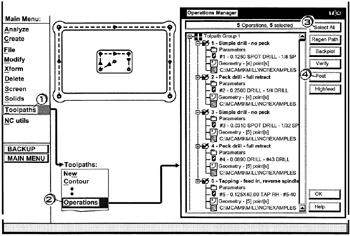
  • Click [1] Toolpaths

  • Click [2] Operation

  • Click [3] the Select All button

  • Click [4] the Post button

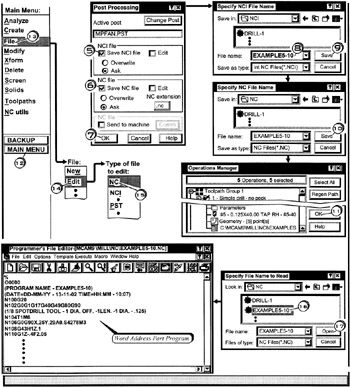
  • Click [5] check in Save NCI file

  • Click [6] check in Save NC file

  • Click [7] OK

  • Click [8] in the File name box; enter EXAMPLE5-10

  • Click [9] Save

  • Click [10] Save

  • Click [11] OK

  • Click [12] MAINMENU

  • Click [13] File

  • Click [14] Edit

  • Click [15] Nc

  • Click [16] E

UNLIMITED FREE
ACCESS
TO THE WORLD'S BEST IDEAS

SUBMIT
Already a GlobalSpec user? Log in.

This is embarrasing...

An error occurred while processing the form. Please try again in a few minutes.

Customize Your GlobalSpec Experience

Category: CNC Machining Services
Finish!
Privacy Policy

This is embarrasing...

An error occurred while processing the form. Please try again in a few minutes.