Learning Mastercam Mill Step by Step

After completing this chapter you will be able to:
Explain what the operations manager is.
State the four parts of each operation.
Know what effect associativity has on edited machining operations
Specify how to use the operations manager to perform the following functions on operations: create new, move, copy and delete.
Understand how to use the operations manager to edit existing toolpaths
Explain how to enter job setup from the operations manager.
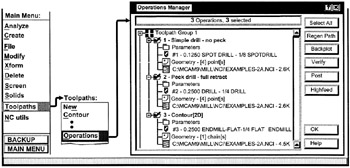
The Operations Manager was introduced in Chapters 5 and 6 as a means for selecting toolpaths to be back plotted or verified. It was also used to edit drill tool paths and to direct Mastercam to generate a word address part program for a set of tool paths. In this Chapter we will take a closer look at the Operations Manager and consider its powerful editing features.

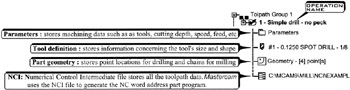
The Operations Manager is the control center for adding new machining operations or changing existing operations for the current job. An operation contains all the information Mastercam needs to machine a toolpath. Each operation has a name and consists of four parts: Parameters, Tool definition, Part geometry and NCI

Associativity
The parts Parameters, Tool definition, Part geometry and NCI are all associated or linked together. When the operator enters a different tool and cutting depth in Parameters and adds a drill point in Part geometry Mastercam flags these changes. Associativity enables the operator...