Learning Mastercam Mill Step by Step

The first step that must be taken in order to execute machining operations on the CAD model of a part is to define all the required cutting tools. Often, it is convenient to select tools from Mastercam's large tool library to create a smaller, customized tool library. This approach provides the operator greater access to the types of tools frequently used in jobs. The customized library can contain the specific dimensions of the tools at hand as well as parameters associated with the tool such as speed and feed set for the types of materials most often machined.
As was mentioned in Chapter 1 information about a cutting tool currently in the tool library database is stored in the tool file with extension .TL9.
Create a customized tool library called
and place the tools listed in Table 5-1 into this library.
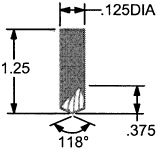
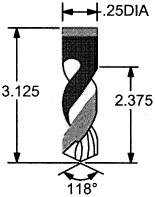
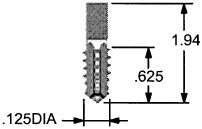
| Tooling | Dimensions |
|---|---|
| 1 / 8 SPOT DRILL. |
![]() |
| 1/4 DRILL |
![]() |
| 1/8-40 UNC TAP |
![]() |
A) ENTER Mastercam's MAIN TOOL LIBRARY. SEARCH AND RETRIEVE A .1 25DIA SPOT DRILL, .25DIA DRILL AND .25DIA FLAT END MILL.

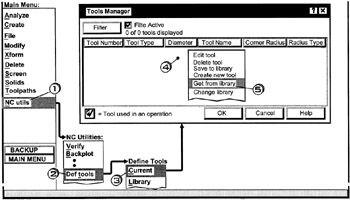
Click [1] NC utils
Click [2] Def tools
Click [3] Current
Right click [4] in the white area , move the cursor down and Click [5] Get from library

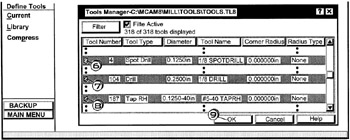
Scroll to the .125in Spot Drill and Click [6]
Scroll to the .25in Drill
Hold the Ctrl button down and Click [7]
Scroll...