Learning Mastercam Mill Step by Step

After completing this chapter you will be able to:
Know how to construct basic 2D geometric entities such as points, lines, arcs, fillets and splines.
Execute rectangle, chamfer and letter constructions in 2D space.
Know how to construct 2D ellipse and polygon geometric entities.
Understand how to use Mastercam's point positioning commands to quickly and accurately locate points on existing geometric entities.
Explain how to pan and zoom screen displays.
State the methods used for repainting and regenerating the screen displays.
The first step in generating toolpaths and the part program in Mastercam is to create the part's geometry using software's CAD package.
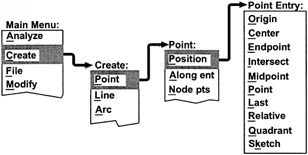
| On CD | A point is displayed on the screen as the symbol ( ) .Points can be used as references to specify locations for subsequent geometric constructions involving lines, circles, arcs, splines, etc |
Creating Points-1

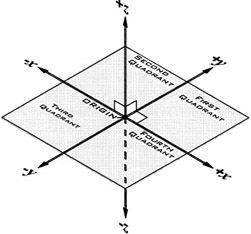
| Note | For rectangular coordinates, Mastercam employs the Cartesian coordinate system for specifying the location of a point in space. This system consists of three directional lines, called axes, that mutually intersect at an angle of 90 . The point of intersection is called the origin. The XY coordinate plane is broken up into four quadrants. The location of a point is determined by first entering its x-distance, then y-distance and finally z-distance from the origin. |

Origin
A point is created at the CAD screen