Learning Mastercam Mill Step by Step

After completing this chapter you will be able to:
Understand the advantages of using Mastercam's operations library
Know how to save operations to the operations library
Explain how to import operations from the operations library.
State how to edit data in the operations library.
Mastercam's Operations Library is an important productivity booster. It enables the operator to catalog and store an operation or sequence of operations under a single group name. For example, the group name stored in the library TAP_1/4-20 could contain the center drilling, drilling and tapping operations required for producing the hole. Later the operator can import the group TAP_1/4-20 from the library and apply it to any other subsequent part as needed. Producing holes that require center drilling, drilling, tapping, reaming, chamfering and circle milling, etc account for a majority of the machining in many shops. Creating a library of these repetative machining operations will cut down on needless duplication of effort.
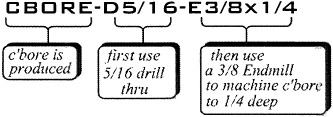
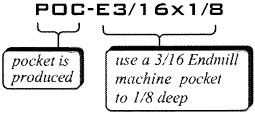
Create the operation group names and the operations associated with each group listed in Table 9-1. Save the groups to the operations library for use in other parts.
| Group Name | Operation(s) | Tooling |
|---|---|---|
|
![]() | CENTER DRILL x.2 DEEP PECK DRILL THRU CIRCLE MILL x.25DEEP | 1/8 CTR DRILL 5/1 6 DRILL 3/8 ENDMILL |
|
![]() | ROUGH AND FINISH POCKET x 125 DEEP. LEAVE 01 FOR FINISH CUT IN XY AND Z | 3/1 6... |