Learning Mastercam Mill Step by Step

5-4: Using the Drill Module on A CAD Model

5-4 Using the Drill Module on A CAD Model

On CD

Drilling operations are carried out with the use of Mastercam's drill module. The module contains cycles for drilling, tapping and boring the CAD model at selected point locations. Special features include automatic determination of the drill depth for thru holes and the automatic selection of drill locations based on matching hole size as well as point sorting based on specific hole patterns.

Example 52:

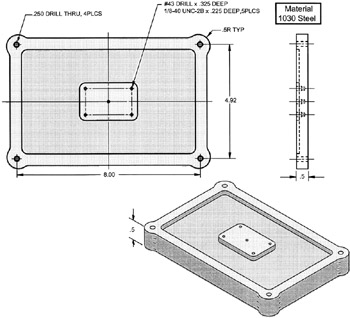
Assume a CAD model the part face shown below has been created in Mastercam.

  • Open the tool library JVAL.TL9: create a .032 Spot drill and add a #43 drill from the main tool library TOOLS.TL9

  • Use the drill module to specify drill locations, assign the tools, select the type of hole operations to be preformed and enter the drilling parameters as outlined in the PROCESS PLAN 5 2


Figure 51
Process Plan 52

Operation

Tooling

Spot Drill x .166 Deep

1/8 Spot Drill

Peck Drill Through

1/4 Drill

Spot Drill x .125 Deep

1/32 Spot Drill

Peck Drill x .325 Deep

#43 Drill(.089in)

Tap x .225 Deep

1/8-40 UNC Tap

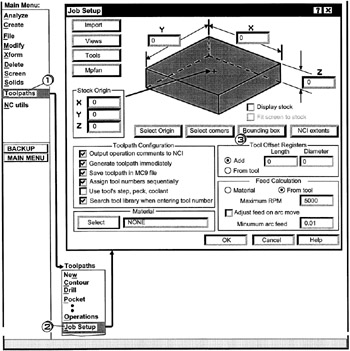
A) ENTER Mastercam's JOB SETUP DIALOG BOX

?

SELECT SIZE OF THE STOCK

  • Click [1] Toolpaths

  • Click [2] Job Setup

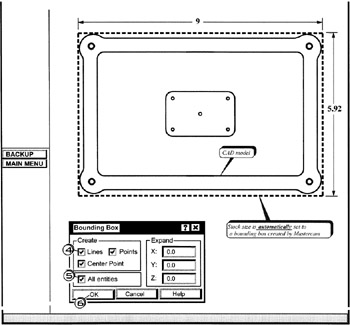
  • Click [3] Bounding box to direct Mastercam to automatically compute the stock size based on a box that just fits around the CAD model.

  • click [4] in the line box

  • click [5]

UNLIMITED FREE
ACCESS
TO THE WORLD'S BEST IDEAS

SUBMIT
Already a GlobalSpec user? Log in.

This is embarrasing...

An error occurred while processing the form. Please try again in a few minutes.

Customize Your GlobalSpec Experience

Category: Guide Bushings and Drill Bushings
Finish!
Privacy Policy

This is embarrasing...

An error occurred while processing the form. Please try again in a few minutes.